Leica S4E & S8APO
| Author: | Mitch Richling |
| Updated: | 2025-12-11 |
Copyright 2026 Mitch Richling. All rights reserved.
Table of Contents
- 1. Introduction
- 2. Microscope Symbols & Formulas
- 3. S4E
- 4. S8APO
- 4.1. Magnification and FOV at Various Zoom Levels With 10x/23 Eyepiece
- 4.2. Reticle Scale, Magnification, and FOV at Zoom Stops With 10x/23 Eyepiece
- 4.3. Numerical Aperture With No Auxiliary Lens
- 4.4. Auxiliary Len Magnification & Working Distance
- 4.5. Leica C-Mount Video Objective Data
- 4.6. Attaching Cameras
- 4.7. Camera FOV & Image Scales
- 5. S4 and S8 Magnification Coverage
- 6. Reticle Unit Conversion Software For free42 and DM42
- 7. S-Series Leica Parts
- 8. Image Sensor Data
- 9. DIY RPI Camera
Check out my home page for more stuff: https://www.mitchr.me/
1. Introduction
This page contains my personal notes for the Leica S8APO & S4E stereo microscopes. Being my personal notes, the content here isn't terribly polished; however, I've gone ahead and published it anyhow in hope someone might find it useful.
2. Microscope Symbols & Formulas
2.1. Variables
| Variable | Description | Units | Notes |
|---|---|---|---|
| \(S_{MAG}\) | Magnification At Sensor | Ratio | |
| \(S_{FOVh}\) | Sensor Horizontal Field Of View | mm | |
| \(S_{FOVv}\) | Sensor Vertical Field Of View | mm | |
| \(I_{SCLh}\) | Image Horizontal Scale | Pixel/mm | |
| \(I_{SCLv}\) | Image Vertical Scale | Pixel/mm | |
| \(S_w\) | Sensor Physical Width | mm | |
| \(S_h\) | Sensor Physical Height | mm | |
| \(S_d\) | Sensor Physical Diagonal | mm | |
| \(S_A\) | Sensor Physical Area | square mm | |
| \(I_w\) | Image/Sensor Pixel Width | pixel | |
| \(I_h\) | Image/Sensor Pixel Height | pixel | |
| \(I_{MP}\) | Total number of Image/Sensor Pixels | Megapixel | |
| \(L_s\) | Length At Sensor | mm | |
| \(L_o\) | Object Length | mm | |
| \(A\) | Auxiliary | Ratio | |
| \(Z\) | Zoom | Ratio | |
| \(O_c\) | Camera Objective | Ratio | camera relay lens, camera port lens |
| \(O_d\) | Camera Objective Image Circle Diameter | mm | |
| \(P_w\) | Sensor Pixel Width | mm | |
| \(P_h\) | Sensor Pixel Height | mm | |
| \(P_{AR}\) | Pixel Aspect Ratio | Ratio | |
| \(V_{FOV}\) | Visual Field Of View | mm | |
| \(E_{FN}\) | Eyepiece Field Number | mm | |
| \(E_{MAG}\) | Eyepiece magnification | Ratio | |
| \(V_{MAG}\) | Visual Magnification | Ratio | |
| \(R_c\) | Reticle Unit Conversion Factor | mm/Ru | \(1\,\mathrm{Ru}=1\,\mathrm{mmu}\) @ \(Z=1\) & \(A=1\) |
| \(R_s\) | Reticle Scale | mm/Ru | |
| \(L_R\) | Length in Reticle Units | Ru | |
| \(I_{AR}\) | Image Aspect Ratio | Ratio | |
| \(P_{IJSPAR}\) | ImageJ Scale Pixel Aspect Ratio | Ratio | |
| \(W\) | Working Distance | mm | |
| \(NA\) | Numerical Aperture | N/A |
2.2. Formulas
- Image/Sensor magnification
- \[S_{MAG} = \frac{L_s}{L_o} = A \cdot Z \cdot O_c\]
- Image/Sensor Horizontal Field Of View
- \[S_{FOVh} = \frac{\min(O_d, S_w)}{S_{MAG}}\]
- Image/Sensor Vertical Field Of View
- \[S_{FOVv} = \frac{\min(O_d, S_h)}{S_{MAG}}\]
- Image/Sensor Horizontal Scale
- \[I_{SCLh} = \frac{S_{MAG} \cdot I_w}{S_w} = \frac{S_{MAG}}{P_w}\]
- Image/Sensor Vertical Scale
- \[I_{SCLv} = \frac{S_{MAG} \cdot I_h}{S_h} = \frac{S_{MAG}}{P_h}\]
- Visual magnification
- \[V_{MAG} = A \cdot Z \cdot E_{MAG}\]
- Visual Field Of View
- \[V_{FOV} = \frac{E_{FN}}{A \cdot Z}\]
- Reticle Scale
- \[\frac{R_c}{Z \cdot A}\]
- Reticle Length Measurements
- \[\mathrm{Length}=R_s \cdot L_R\]
- Sensor Diagonal length
- \[S_d = \sqrt{S_w^2 + S_h^2}\]
- Sensor Pixel Width
- \[P_w = \frac{S_w}{I_w}\]
- Sensor Pixel Height
- \[P_h = \frac{S_h}{I_h}\]
- Pixel Aspect Ratio
- \[P_{AR} = \frac{P_w}{P_h} = \frac{S_w \cdot I_h}{I_w \cdot S_h}\]
- Image Aspect Ratio
- \[I_{AR} = \frac{I_w}{I_h}\]
- ImageJ Scale Pixel Aspect Ratio
- \[P_{IJSPAR} = \frac{1}{P_{AR}}\]
3. S4E
3.1. Magnification and FOV at Various Zoom Levels With 10x/23 Eyepiece
| \(A=\) | \(W=\) | \(A=\) | \(W=\) | \(A=\) | \(W=\) | \(A=\) | \(W=\) | \(A=\) | \(W=\) | |
|---|---|---|---|---|---|---|---|---|---|---|
| \(0.5\times\) | \(200\,\mathrm{mm}\) | \(0.75\times\) | \(130\,\mathrm{mm}\) | \(1.0\times\) | \(110\,\mathrm{mm}\) | \(1.6\times\) | \(55\,\mathrm{mm}\) | \(2.0\times\) | \(35\,\mathrm{mm}\) | |
| \(Z\) | \(E_{MAG}\) | \(V_{FOV}\) | \(E_{MAG}\) | \(V_{FOV}\) | \(E_{MAG}\) | \(V_{FOV}\) | \(E_{MAG}\) | \(V_{FOV}\) | \(E_{MAG}\) | \(V_{FOV}\) |
| 0.63 | 3.15 | 73.02 | 4.72 | 48.68 | 6.30 | 36.51 | 10.08 | 22.82 | 12.60 | 18.25 |
| 0.80 | 4.00 | 57.50 | 6.00 | 38.33 | 8.00 | 28.75 | 12.80 | 17.97 | 16.00 | 14.38 |
| 1.00 | 5.00 | 46.00 | 7.50 | 30.67 | 10.00 | 23.00 | 16.00 | 14.38 | 20.00 | 11.50 |
| 1.25 | 6.25 | 36.80 | 9.38 | 24.53 | 12.50 | 18.40 | 20.00 | 11.50 | 25.00 | 9.20 |
| 1.60 | 8.00 | 28.75 | 12.00 | 19.17 | 16.00 | 14.38 | 25.60 | 8.98 | 32.00 | 7.19 |
| 2.00 | 10.00 | 23.00 | 15.00 | 15.33 | 20.00 | 11.50 | 32.00 | 7.19 | 40.00 | 5.75 |
| 2.50 | 12.50 | 18.40 | 18.75 | 12.27 | 25.00 | 9.20 | 40.00 | 5.75 | 50.00 | 4.60 |
| 3.00 | 15.00 | 15.33 | 22.50 | 10.22 | 30.00 | 7.67 | 48.00 | 4.79 | 60.00 | 3.83 |
3.2. Reticle Scale, Magnification, and FOV at Zoom Stops With 10x/23 Eyepiece
| \(A\) | \(Z\) | \(E_{MAG}\) | \(E_{FN}\) | \(R_s\) | \(V_{MAG}\) | \(V_{FOV}\) |
|---|---|---|---|---|---|---|
| 0.50 | 0.63 | 10 | 23 | 3.17460 | 3.15 | 73.02 |
| 0.50 | 3.00 | 10 | 23 | 0.66667 | 15.00 | 15.33 |
| 0.75 | 0.63 | 10 | 23 | 2.11640 | 4.72 | 48.68 |
| 0.75 | 3.00 | 10 | 23 | 0.44444 | 22.50 | 10.22 |
| 1.00 | 0.63 | 10 | 23 | 1.58730 | 6.30 | 36.51 |
| 1.00 | 3.00 | 10 | 23 | 0.33333 | 30.00 | 7.67 |
| 1.60 | 0.63 | 10 | 23 | 0.99206 | 10.08 | 22.82 |
| 1.60 | 3.00 | 10 | 23 | 0.20833 | 48.00 | 4.79 |
| 2.00 | 0.63 | 10 | 23 | 0.79365 | 12.60 | 18.25 |
| 2.00 | 3.00 | 10 | 23 | 0.16667 | 60.00 | 3.83 |
3.3. Auxiliary Len Magnification & Working Distance
| \(A\) | \(W\) | Perf | Part |
|---|---|---|---|
| \(0.32\times\) | 300 mm | Acro | 10446316 |
| \(0.5\times\) | 200 mm | Acro | 10446318 |
| \(0.63\times\) | 155 mm | Acro | 10446319 |
| \(0.75\times\) | 130 mm | Acro | 10446320 |
| \(1.6\times\) | 55 mm | Acro | 10446321 |
| \(2.0\times\) | 35 mm | Acro | 10446322 |
| \(0.3–0.4\times\) | 200–350 mm | Acro | 10446325 |
| \(0.6–0.75\times\) | 77–137 mm | Acro | 10446323 |
4. S8APO
4.1. Magnification and FOV at Various Zoom Levels With 10x/23 Eyepiece
| \(A=\) | \(W=\) | \(A=\) | \(W=\) | \(A=\) | \(W=\) | \(A=\) | \(W=\) | |
|---|---|---|---|---|---|---|---|---|
| \(0.32\times\) | \(200\,\mathrm{mm}\) | \(0.63\times\) | \(101\,\mathrm{mm}\) | \(1.0\times\) | \(75\,\mathrm{mm}\) | \(2.0\times\) | \(25\,\mathrm{mm}\) | |
| \(Z\) | \(V_{MAG}\) | \(V_{FOV}\) | \(V_{MAG}\) | \(V_{FOV}\) | \(V_{MAG}\) | \(V_{FOV}\) | \(V_{MAG}\) | \(V_{FOV}\) |
| 1.0 | 3.2 | 71.88 | 6.30 | 36.51 | 10.0 | 23.00 | 20 | 11.50 |
| 1.25 | 4.0 | 57.50 | 7.88 | 29.21 | 12.5 | 18.40 | 25 | 9.20 |
| 1.6 | 5.1 | 44.92 | 10.08 | 22.82 | 16.0 | 14.38 | 32 | 7.19 |
| 2.0 | 6.4 | 35.94 | 12.60 | 18.25 | 20.0 | 11.50 | 40 | 5.75 |
| 2.5 | 8.0 | 28.75 | 15.75 | 14.60 | 25.0 | 9.20 | 50 | 4.60 |
| 3.2 | 10.2 | 22.46 | 20.16 | 11.41 | 32.0 | 7.19 | 64 | 3.59 |
| 4.0 | 12.8 | 17.97 | 25.20 | 9.13 | 40.0 | 5.75 | 80 | 2.88 |
| 5.0 | 16.0 | 14.38 | 31.50 | 7.30 | 50.0 | 4.60 | 100 | 2.30 |
| 6.3 | 20.2 | 11.41 | 39.69 | 5.79 | 63.0 | 3.65 | 126 | 1.83 |
| 8.0 | 25.6 | 8.98 | 50.40 | 4.56 | 80.0 | 2.88 | 160 | 1.44 |
4.2. Reticle Scale, Magnification, and FOV at Zoom Stops With 10x/23 Eyepiece
| \(A\) | \(Z\) | \(E_{MAG}\) | \(E_{FN}\) | \(R_s\) | \(V_{MAG}\) | \(V_{FOV}\) |
|---|---|---|---|---|---|---|
| 0.32 | 1 | 10 | 23 | 3.12500 | 3.20 | 71.88 |
| 0.32 | 8 | 10 | 23 | 0.39062 | 25.60 | 8.98 |
| 0.63 | 1 | 10 | 23 | 1.58730 | 6.30 | 36.51 |
| 0.63 | 8 | 10 | 23 | 0.19841 | 50.40 | 4.56 |
| 1.00 | 1 | 10 | 23 | 1.00000 | 10.00 | 23.00 |
| 1.00 | 8 | 10 | 23 | 0.12500 | 80.00 | 2.88 |
| 2.00 | 1 | 10 | 23 | 0.50000 | 20.00 | 11.50 |
| 2.00 | 8 | 10 | 23 | 0.06250 | 160.00 | 1.44 |
4.3. Numerical Aperture With No Auxiliary Lens
| Zoom | Numerical Aperture |
|---|---|
| \(Z\) | \(NA\) |
| 1.0 | 0.026 |
| 1.25 | 0.031 |
| 1.6 | 0.038 |
| 2.0 | 0.046 |
| 2.5 | 0.056 |
| 3.2 | 0.069 |
| 4.0 | 0.081 |
| 5.0 | 0.093 |
| 6.3 | 0.100 |
| 8.0 | 0.100 |
4.4. Auxiliary Len Magnification & Working Distance
| Leica Part # | \(A\) | \(W\) | Perf |
|---|---|---|---|
| 10446334 | \(0.32\times\) | 200 mm | Achro |
| 10446335 | \(0.63\times\) | 100 mm | APO |
| 10446336 | \(1.6\times\) | 37 mm | APO |
| 10446337 | \(2.0\times\) | 25 mm | APO |
4.5. Leica C-Mount Video Objective Data
| Leica Part # | Leica Part Name | Mag | \(O_d\) | Notes | Ref |
|---|---|---|---|---|---|
| 10445928 | Leica Video Objective \(0.32\times\) | 0.32 | 6.7 | Estimated \(O_d\) | co32 |
| 10450528 | Leica Video Objective \(0.5\times\) | 0.50 | 10.5 | Measured \(O_d\) | co50 |
| 10447367 | Leica Video Objective \(0.63\times\) | 0.63 | 13.2 | Estimated \(O_d\) | co63 |
| 10446307 | Leica Video Objective \(0.8\times\) | 0.80 | 16.8 | Estimated \(O_d\) | co80 |
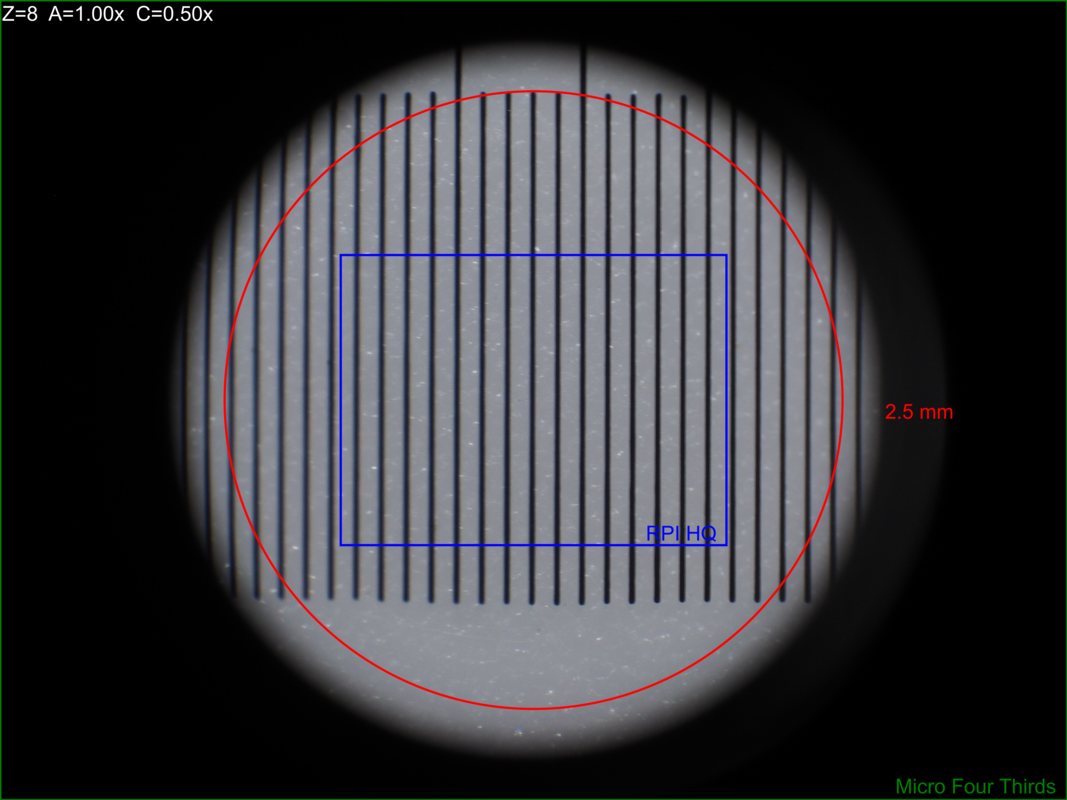
Note the image circles are all the same size at the sensor for a particular video objective, but FOV will change with the auxiliary lens.
With \(O_d=0.5\times\) we can capture the full image circle with a Micro Four Thirds (Olympus OM-D E-M1 Mark II) sensor, but only about 37% of the image circle with an IMX477 (RPI HQ) sensor. Note that about 65% of the Micro Four Thirds sensor is outside the image circle – i.e. wasted pixels.
| \(Z=1\) | \(Z=8\) | |
| \(A=0.63\) | 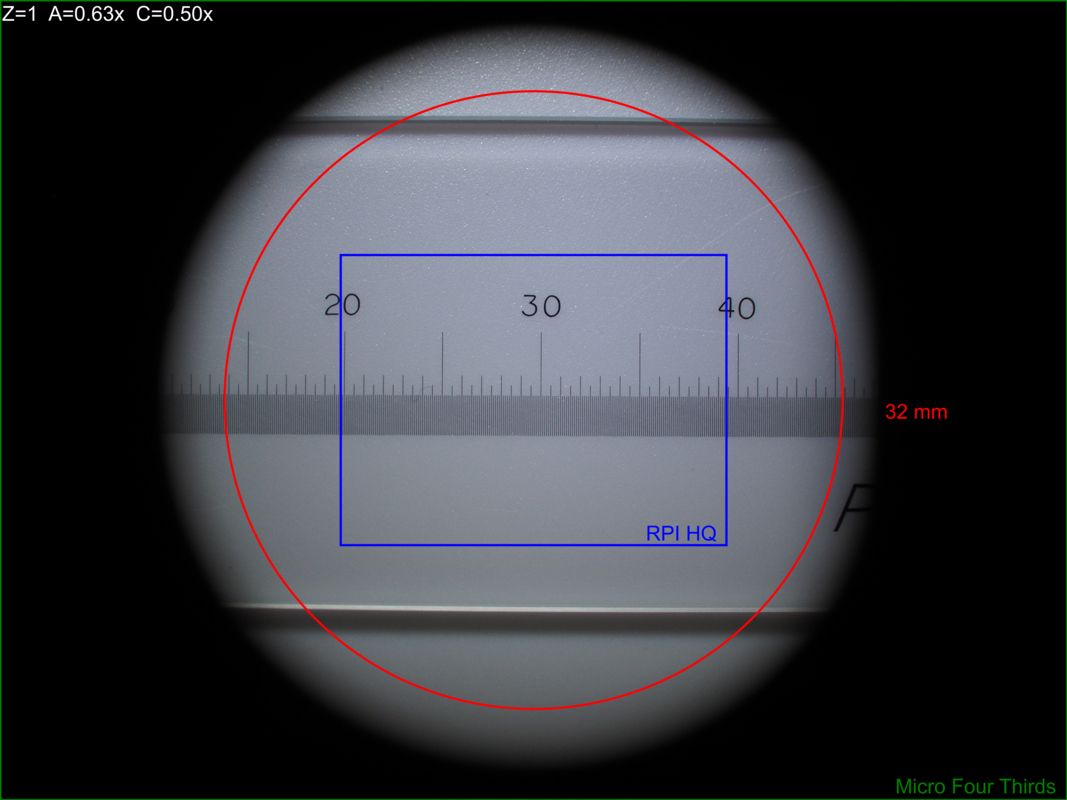 |
 |
| \(A=1.00\) | 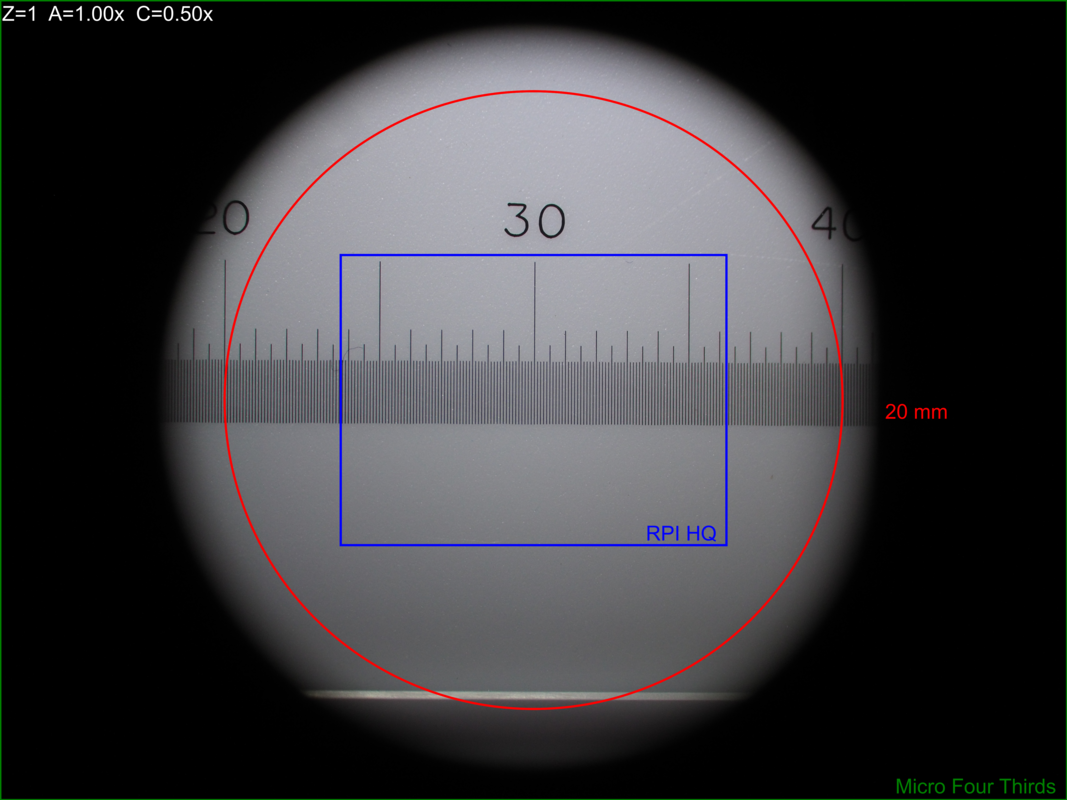 |
 |
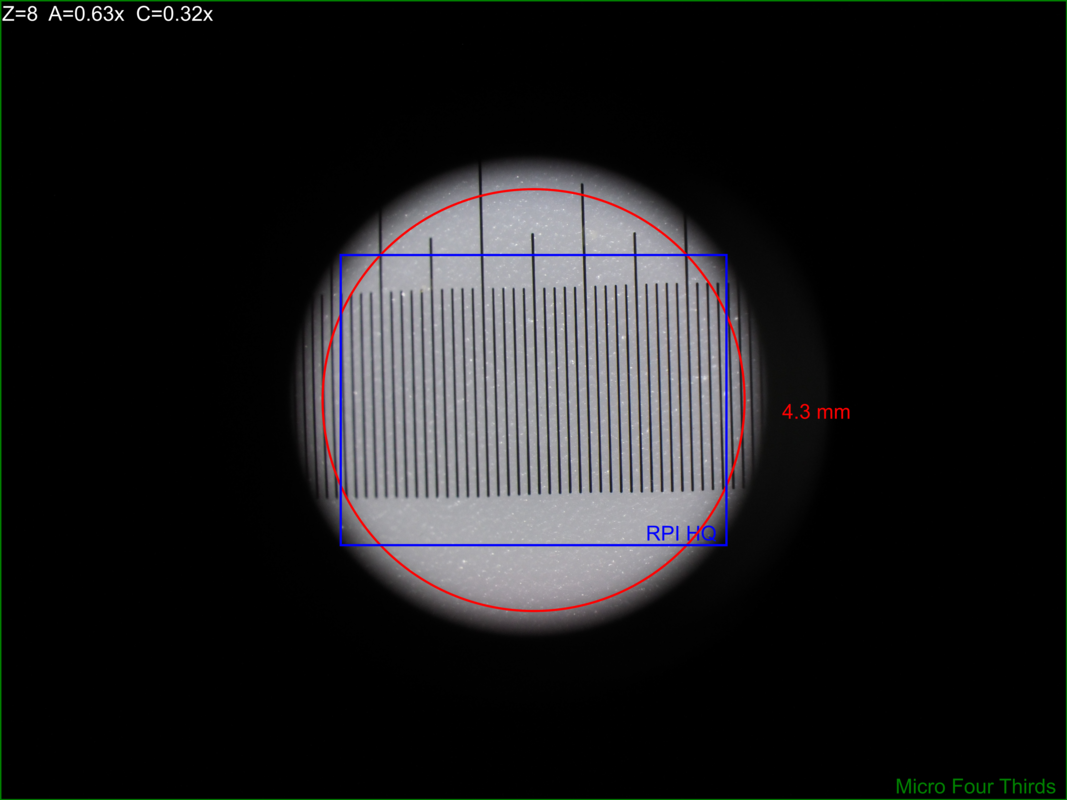
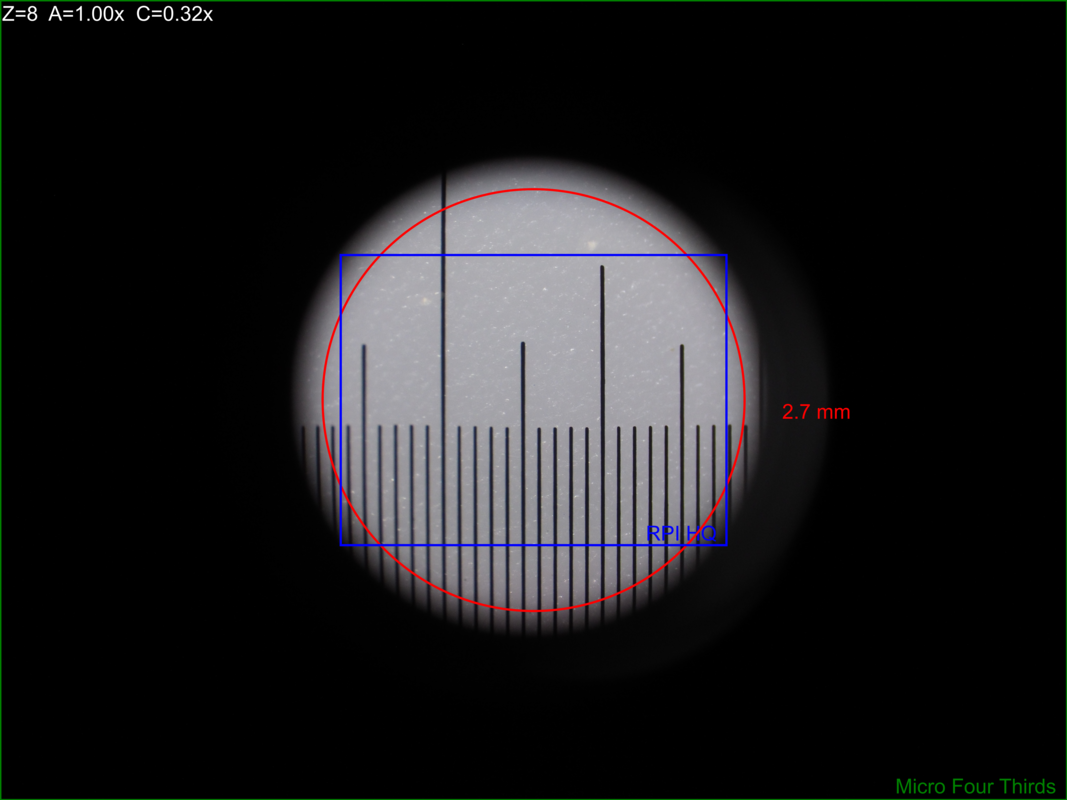
With \(O_d=0.32\times\) the image circle shrinks, and now we can capture about 76% of the image circle with an IMX477 (RPI HQ); however, about 3% percent of the sensor is outside the image circle – i.e. wasted sensor pixels. Note that with the smaller image circle the Micro Four Thirds sensor is even less efficiently used with about 84% of the sensor pixels wasted.
| \(Z=1\) | \(Z=8\) | |
| \(A=0.63\) | 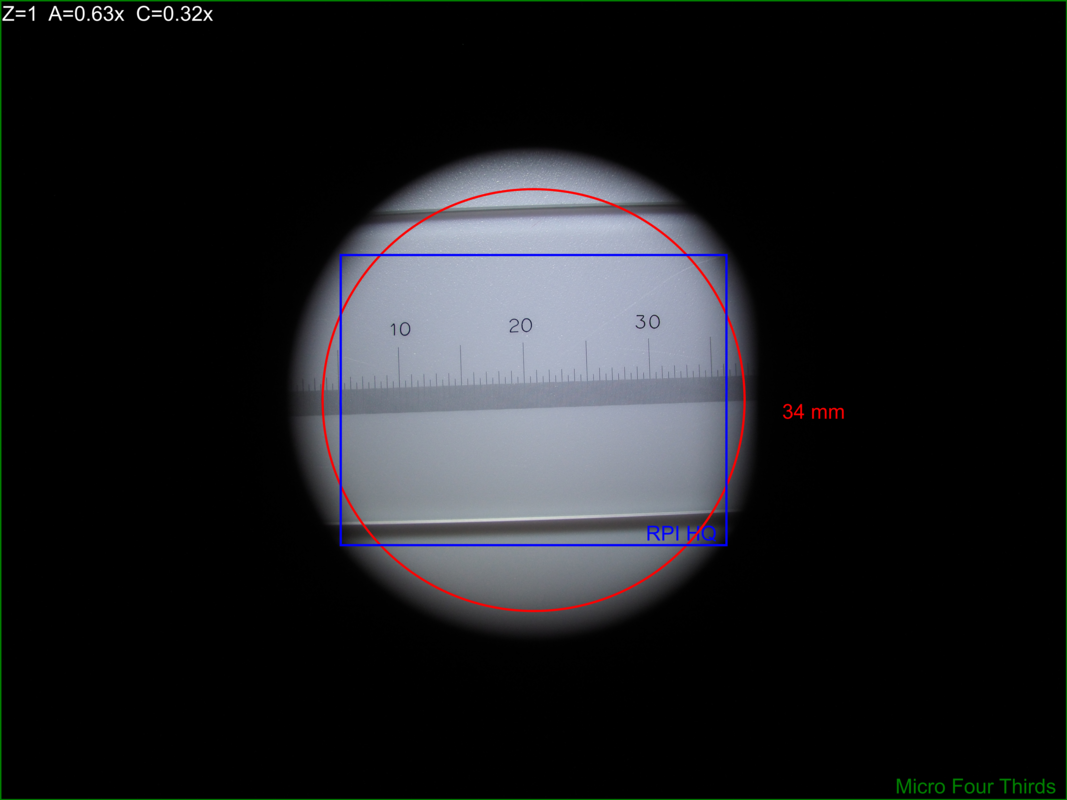 |
 |
| \(A=1.00\) |  |
 |
4.6. Attaching Cameras
The Leica documentation suggests using a chain of adapters for attaching a generic digital camera. The first part of the chain is one of the following three parts: 10447436 1.6× DSLR tube, 10446175 2.5× DSLR tube, or 10445930 1.0× video/photo objective. Next will be one or more adapters for your camera. The result can be a tower of adapters taller than your microscope! For cameras with large sensors, this really is the only way to go. An excellent write-up for this approach may be found here. A good discussion on MicrobeHunter.com may found here.
For cameras with Micro Four Thirds and smaller sensors, a simpler approach is connect your camera via a c-mount adapter to one of Leica's "C-Mount Video Objectives": 10445928 \(0.32\times\), 10450528 \(0.5\times\), 10447367 \(0.63\times\), or 10446307 \(0.8\times\). These adapters are intended to be used with Leica's microscope cameras, but they will work with any c-mount camera – including your SLR with a c-mount adapter.
With the \(0.5\times\) objective one will obtain a nice 10.5mm image circle which is just about perfect for whole field imaging with the 13mm tall sensor in a Micro Four Thirds camera.
I use two cameras with my S8APO:
- Olympus OM-D E-M1 Mark II with a \(0.5\times\) or \(0.32\times\) video objective
- A DIY solution with a Raspberry Pi & Raspberry Pi HQ Camera attached to a \(0.32\times\) video objective.
4.7. Camera FOV & Image Scales
| RPI | OLY | |||||||||||||
|---|---|---|---|---|---|---|---|---|---|---|---|---|---|---|
| \(A\) | \(Z\) | \(O_c\) | \(O_d\) | \(S_{MAG}\) | \(P_{IJSPAR}\) | \(I_{SCLh}\) | \(I_{SCLv}\) | \(S_{FOVh}\) | \(S_{FOVv}\) | \(P_{IJSPAR}\) | \(I_{SCLh}\) | \(I_{SCLv}\) | \(S_{FOVh}\) | \(S_{FOVv}\) |
| 0.63 | 1 | 0.50 | 10.5 | 0.32 | 1.0000000 | 203.23 | 203.23 | 19.96 | 14.96 | 0.9961686 | 93.85 | 94.21 | 33.33 | 33.33 |
| 0.63 | 8 | 0.50 | 10.5 | 2.52 | 1.0000000 | 1625.81 | 1625.81 | 2.49 | 1.87 | 0.9961686 | 750.79 | 753.67 | 4.17 | 4.17 |
| 1.00 | 1 | 0.50 | 10.5 | 0.50 | 1.0000000 | 322.58 | 322.58 | 12.57 | 9.42 | 0.9961686 | 148.97 | 149.54 | 21.00 | 21.00 |
| 1.00 | 8 | 0.50 | 10.5 | 4.00 | 1.0000000 | 2580.65 | 2580.65 | 1.57 | 1.18 | 0.9961686 | 1191.72 | 1196.31 | 2.62 | 2.62 |
| 2.00 | 1 | 0.50 | 10.5 | 1.00 | 1.0000000 | 645.16 | 645.16 | 6.29 | 4.71 | 0.9961686 | 297.93 | 299.08 | 10.50 | 10.50 |
| 2.00 | 8 | 0.50 | 10.5 | 8.00 | 1.0000000 | 5161.29 | 5161.29 | 0.79 | 0.59 | 0.9961686 | 2383.45 | 2392.62 | 1.31 | 1.31 |
5. S4 and S8 Magnification Coverage
Various magnifications may be reached with different combinations of eyepiece, power, & auxiliary lens.
| \(E_{MAG}\) | \(A\) | 003 | 004 | 005 | 006 | 008 | 010 | 013 | 016 | 020 | 026 | 032 | 040 | 050 | 064 | 080 | 100 | 128 | 160 | 200 | 256 | 320 | 400 | 500 | 640 |
|---|---|---|---|---|---|---|---|---|---|---|---|---|---|---|---|---|---|---|---|---|---|---|---|---|---|
| \(10\times\) | \(0.50\times\) | ✓ |
✓ |
✓ |
✓ |
✓ |
✓ |
✓ |
✓ |
||||||||||||||||
| \(10\times\) | \(0.75\times\) | ✓ |
✓ |
✓ |
✓ |
✓ |
✓ |
✓ |
|||||||||||||||||
| \(16\times\) | \(0.50\times\) | - |
- |
- |
- |
- |
- |
- |
- |
||||||||||||||||
| \(10\times\) | \(1.00\times\) | ✓ |
✓ |
✓ |
✓ |
✓ |
✓ |
✓ |
✓ |
||||||||||||||||
| \(25\times\) | \(0.50\times\) | - |
- |
- |
- |
- |
- |
- |
- |
||||||||||||||||
| \(10\times\) | \(1.60\times\) | ✓ |
✓ |
✓ |
✓ |
✓ |
✓ |
✓ |
✓ |
||||||||||||||||
| \(20\times\) | \(1.00\times\) | - |
- |
- |
- |
- |
- |
- |
- |
||||||||||||||||
| \(10\times\) | \(2.00\times\) | ✓ |
✓ |
✓ |
✓ |
✓ |
✓ |
✓ |
✓ |
||||||||||||||||
| \(16\times\) | \(1.60\times\) | - |
- |
- |
- |
- |
- |
- |
- |
||||||||||||||||
| \(20\times\) | \(1.60\times\) | - |
- |
- |
- |
- |
- |
- |
- |
||||||||||||||||
| \(25\times\) | \(1.60\times\) | - |
- |
- |
- |
- |
- |
- |
- |
||||||||||||||||
| \(40\times\) | \(1.60\times\) | - |
- |
- |
- |
- |
- |
- |
- |
||||||||||||||||
| \(40\times\) | \(2.00\times\) | - |
- |
- |
- |
- |
- |
- |
- |
| \(E_{MAG}\) | \(A\) | 003 | 004 | 005 | 006 | 008 | 010 | 013 | 016 | 020 | 026 | 032 | 040 | 050 | 064 | 080 | 100 | 128 | 160 | 200 | 256 | 320 | 400 | 500 | 640 |
|---|---|---|---|---|---|---|---|---|---|---|---|---|---|---|---|---|---|---|---|---|---|---|---|---|---|
| \(10\times\) | \(0.32\times\) | ✓ |
✓ |
✓ |
✓ |
✓ |
✓ |
✓ |
✓ |
✓ |
✓ |
||||||||||||||
| \(10\times\) | \(0.63\times\) | ✓ |
✓ |
✓ |
✓ |
✓ |
✓ |
✓ |
✓ |
✓ |
✓ |
||||||||||||||
| \(10\times\) | \(1.00\times\) | ✓ |
✓ |
✓ |
✓ |
✓ |
✓ |
✓ |
✓ |
✓ |
✓ |
||||||||||||||
| \(20\times\) | \(0.63\times\) | - |
- |
- |
- |
- |
- |
- |
- |
- |
- |
||||||||||||||
| \(16\times\) | \(1.00\times\) | ✓ |
✓ |
✓ |
✓ |
✓ |
✓ |
✓ |
✓ |
✓ |
✓ |
||||||||||||||
| \(10\times\) | \(2.00\times\) | ✓ |
✓ |
✓ |
✓ |
✓ |
✓ |
✓ |
✓ |
✓ |
✓ |
||||||||||||||
| \(25\times\) | \(1.00\times\) | - |
- |
- |
- |
- |
- |
- |
- |
- |
- |
||||||||||||||
| \(16\times\) | \(2.00\times\) | - |
- |
- |
- |
- |
- |
- |
- |
- |
- |
||||||||||||||
| \(40\times\) | \(1.00\times\) | - |
- |
- |
- |
- |
- |
- |
- |
- |
- |
||||||||||||||
| \(25\times\) | \(2.00\times\) | - |
- |
- |
- |
- |
- |
- |
- |
- |
- |
||||||||||||||
| \(40\times\) | \(2.00\times\) | - |
- |
- |
- |
- |
- |
- |
- |
- |
- |
| Color | Meaning |
|---|---|
| APO | |
| Acro |
| Symbol | Meaning |
|---|---|
| - | I don't have this combination of equipment |
✓ |
I have this combination of equipment |
6. Reticle Unit Conversion Software For free42 and DM42
The computational part of this code is trivial. The value of the program really is in the settings menus – allowing the user to quickly change equipment settings and convert measurements.
The code as-is will work pretty well for people using an S8APO or S4E scope with a 10x EP and standard reticle; however, users with diffrent equipment will want to modify the settings menus.
6.1. The menu
| Key | Without [SHIFT] |
With [SHIFT] |
Notes |
|---|---|---|---|
A |
Store A | Display A | Stored in variable "mrcvA" |
Z |
Store Z | Display Z | Stored in variable "mrcvZ" |
Rc |
Store Rc | Display Rc | Stored in variable "mrcvRc" |
▒▒▒▒ |
|||
▒▒▒▒ |
|||
CONV |
Convert from Reticle Units | Convert from Reticle Units | |
8;.32 |
Leica S8APO; Z=1.00x; A=0.32x aux | Leica S8APO; Z=8.00x; A=0.32x aux | |
8;.63 |
Leica S8APO; Z=1.00x; A=0.63x aux | Leica S8APO; Z=8.00x; A=0.63x aux | |
8;1 |
Leica S8APO; Z=1.00x; A=1.00x (no aux) | Leica S8APO; Z=8.00x; A=1.00x (no aux) | |
8;1.6 |
Leica S8APO; Z=1.00x; A=1.60x aux | Leica S8APO; Z=8.00x; A=1.60x aux | |
8;2 |
Leica S8APO; Z=1.00x; A=2.00x aux | Leica S8APO; Z=8.00x; A=2.00x aux | |
ZZZ |
Leica S8APO; Z=1.00x; A=NO CHANGE | Leica S8APO; Z=8.00x; A=NO CHANGE | |
4;.32 |
Leica S4; Z=0.63x; A=0.32x aux | Leica S4; Z=3.00x; A=0.32x aux | |
4;.5 |
Leica S4; Z=0.63x; A=0.50x aux | Leica S4; Z=3.00x; A=0.50x aux | |
4;.63 |
Leica S4; Z=0.63x; A=0.63x aux | Leica S4; Z=3.00x; A=0.63x aux | |
4;.75 |
Leica S4; Z=0.63x; A=0.75x aux | Leica S4; Z=3.00x; A=0.75x aux | |
4;1 |
Leica S4; Z=0.63x; A=1.00x (no aux) | Leica S4; Z=3.00x; A=1.00x (no aux) | |
4;1.6 |
Leica S4; Z=0.63x; A=1.60x aux | Leica S4; Z=3.00x; A=1.60x aux |
6.2. The code
The code below may be cut-n-pasted into free42.
@@@@@@@@@@@@@@@@@@@@@@@@@@@@@@@@@@@@@@@@@@@@@@@@@@@@@@@@@@@@@@@@@@@@@@@@@@@@@@@@ (MRCONV)
@@@@ DSC: Convert Reticle Units to Physical Units
LBL "MRCONV"

LBL 01           @@@@ Conversion & Variable Menu Page
CLMENU
"A"
KEY 1 XEQ 11
"Z"
KEY 2 XEQ 12
"Rc"
KEY 3 XEQ 13
"CONV"
KEY 6 XEQ 14
KEY 7 GTO 03
KEY 8 GTO 02
KEY 9 GTO 00
MENU
STOP
GTO 01

LBL 02           @@@@ Quick Settings Menu Page #1
CLMENU
"8;.32"            @@@@ Setting: S8 with 0.32x aux
KEY 1 GTO 20
"8;.63"            @@@@ Setting: S8 with 0.63x aux
KEY 2 GTO 21
"8;1"              @@@@ Setting: S8 with no aux
KEY 3 GTO 22
"8;1.6"            @@@@ Setting: S8 with 1.6x aux
KEY 4 GTO 23
"8;2"              @@@@ Setting: S8 with 2x aux
KEY 5 GTO 24
"ZZZ"              @@@@ Setting: Toggle Zoom
KEY 6 XEQ 25
KEY 7 GTO 01
KEY 8 GTO 03
KEY 9 GTO 00
MENU
STOP
GTO 02

LBL 03           @@@@ Quick Settings Menu Page #2
CLMENU
"4;.32"            @@@@ Setting: S4 with 0.32x aux
KEY 1 GTO 30
"4;.5"             @@@@ Setting: S4 with 0.5x aux
KEY 2 GTO 31
"4;.63"            @@@@ Setting: S4 with 0.63x aux
KEY 3 GTO 32
"4;.75"            @@@@ Setting: S4 with 0.75x aux
KEY 4 GTO 33
"4;1"              @@@@ Setting: S4 with no aux
KEY 5 GTO 34
"4;1.6"            @@@@ Setting: S4 with 1.6x aux
KEY 6 XEQ 35
KEY 7 GTO 02
KEY 8 GTO 01
KEY 9 GTO 00
MENU
STOP
GTO 03

LBL 00           @@@@ Application Exit
EXITALL
RTN

LBL 11           @@@@ Code for menu key A
FC? 64
STO "mrcvA"
VIEW "mrcvA"
RTN
LBL 12           @@@@ Code for menu key Z
FC? 64
STO "mrcvZ"
VIEW "mrcvZ"
RTN
LBL 13           @@@@ Code for menu key Rc
FC? 64
STO "mrcvRc"
VIEW "mrcvRc"
RTN
LBL 14           @@@@ Code for menu key CONV
RCL× "mrcvRc"
RCL÷ "mrcvA"
RCL÷ "mrcvZ"
RTN

LBL 20           @@@@ Code for Setting S8: with 0.32x aux
1                  @@@@ Rc Value
STO "mrcvRc"
R↓
0.32               @@@@ A Value
STO "mrcvA"
GTO 26             @@@@ Set Z Value
LBL 21           @@@@ Code for Setting: S8 with 0.63x aux
1                  @@@@ Rc Value
STO "mrcvRc"
R↓
0.63               @@@@ A Value
STO "mrcvA"
GTO 26             @@@@ Set Z Value
LBL 22           @@@@ Code for Setting: S8 with no aux
1                  @@@@ Rc Value
STO "mrcvRc"
R↓
1.00               @@@@ A Value
STO "mrcvA"
GTO 26             @@@@ Set Z Value
LBL 23           @@@@ Code for Setting: S8 with 1.6x aux
1                  @@@@ Rc Value
STO "mrcvRc"
R↓
1.60               @@@@ A Value
STO "mrcvA"
GTO 26             @@@@ Set Z Value
LBL 24           @@@@ Code for Setting: S8 with 2x aux
1                  @@@@ Rc Value
STO "mrcvRc"
R↓
2.00               @@@@ A Value
STO "mrcvA"
GTO 26             @@@@ Set Z Value
LBL 25           @@@@ Code for Setting: EMPTY
GTO 26             @@@@ Set Z Value

LBL 26 @@@@ Drop X & set the zoom level for S8 Scope
R↓
FC? 64
1.0               @@@@ Z Value NO SHIFT
FS? 64
8.0               @@@@ Z Value SHIFT
STO "mrcvZ"
GTO 01

LBL 30           @@@@ Code for Setting: S4 with 0.32x aux
1                  @@@@ Rc Value
STO "mrcvRc"
R↓
0.32               @@@@ A Value
STO "mrcvA"
GTO 36             @@@@ Set Z Value
LBL 31           @@@@ Code for Setting: S4 with 0.5x aux
1                  @@@@ Rc Value
STO "mrcvRc"
R↓
0.50               @@@@ A Value
STO "mrcvA"
GTO 36             @@@@ Set Z Value
LBL 32           @@@@ Code for Setting: S4 with 0.63x aux
1                  @@@@ Rc Value
STO "mrcvRc"
R↓
0.63               @@@@ A Value
STO "mrcvA"
GTO 36             @@@@ Set Z Value
LBL 33           @@@@ Code for Setting: S4 with 0.75x aux
1                  @@@@ Rc Value
STO "mrcvRc"
R↓
0.75               @@@@ A Value
STO "mrcvA"
GTO 36             @@@@ Set Z Value
LBL 34           @@@@ Code for Setting: S4 with no aux
1                  @@@@ Rc Value
STO "mrcvRc"
R↓
1.00               @@@@ A Value
STO "mrcvA"
GTO 36             @@@@ Set Z Value
LBL 35           @@@@ Code for Setting: S4 with 1.6x aux
1                  @@@@ Rc Value
STO "mrcvRc"
R↓
1.60               @@@@ A Value
STO "mrcvA"
GTO 36             @@@@ Set Z Value

LBL 36 @@@@ Drop X & Set the zoom level for S4 Scope
R↓
FC? 64
0.63               @@@@ Z Value NO SHIFT
FS? 64
3.0                @@@@ Z Value SHIFT
STO "mrcvZ"
GTO 01

END
7. S-Series Leica Parts
| Leica Part # | Leica Part Name | |
|---|---|---|
| 1 | 10446298 | Leica S8 APO Microscope |
| 1 | 10446293 | Leica S4 E Microscope |
| 2 | 10447136 | 10×/23B eyepiece for eyeglasses, fixed |
| 4 | 10447137 | 10×/23B eyepiece for eyeglasses, adjustable, accepts reticles |
| 10447138 | 16×/15B eyepiece for eyeglasses, fixed | |
| 10447139 | 16×/15B eyepiece for eyeglasses, adjustable, accepts reticles | |
| 10447130 | 10×/23 eyepiece, fixed | |
| 10447131 | 10×/23 eyepiece, adjustable, accepts reticles | |
| 10447132 | 16×/16 eyepiece, fixed | |
| 10447133 | 16×/16 eyepiece, adjustable, accepts reticles | |
| 10447134 | 20×/12 eyepiece, fixed | |
| 10447135 | 20×/12 eyepiece, adjustable, accepts reticles | |
| 10446326 | 10x/23 eyepiece for eyeglasses, fixed | |
| 10446329 | 10x/23 eyepiece for eyeglasses, adjustable, accepts reticles | |
| 10445301 | 16x/14B eyepiece for eyeglasses, adjustable, accepts reticles, requires spacer | |
| 10445302 | 25x/9.5B eyepiece for eyeglasses, adjustable, accepts reticles, requires spacer | |
| 10445303 | 40x/6B eyepiece for eyeglasses, adjustable, accepts reticles, requires spacer | |
| 2 | 10446447 | Reticle 10 mm/0.1 mm |
| 10446448 | Reticle 5 mm/0.1 mm | |
| 10446449 | Reticle 5 mm/0.05 mm | |
| 10447000 | Reticle 100 scale intervals / 0.002" | |
| 10447001 | Reticle 100 scale intervals / 0.001" | |
| 10447002 | Reticle 150 scale intervals / 0.0005" | |
| 1 | 10446334 | Achro Auxiliary \(0.32\times\) for S8APO, WD 200 mm |
| 1 | 10446335 | APO Auxiliary \(0.63\times\) for S8APO, WD 100 mm |
| 10446336 | APO Auxiliary \(1.6\times\) for S8APO, WD 37 mm | |
| 1 | 10446337 | APO Auxiliary \(2.0\times\) for S8APO, WD 25 mm |
| 10446316 | Auxiliary \(0.32\times\) for S4/S6, WD 300 mm | |
| 1 | 10446318 | Auxiliary \(0.5\times\) for S4/S6, WD 200 mm |
| 1 | 10446319 | Auxiliary \(0.63\times\) for S4/S6, WD 155 mm |
| 1 | 10446320 | Auxiliary \(0.75\times\) for S4/S6, WD 130 mm |
| 1 | 10446321 | Auxiliary \(1.6\times\) for S4/S6, WD 55 mm |
| 1 | 10446322 | Auxiliary \(2.0\times\) for S4/S6, WD 35 mm |
| 10446325 | Auxiliary \(0.3–0.4\times\) for S4/S6 (Adjustable), WD 200–350mm | |
| 10446323 | Auxiliary \(0.6–0.75\times\) for S4/S6 (ErgoObjective) WD 77–137mm | |
| 10446324 | Lens shield | |
| 10450831 | Updated lens shield | |
| 1 | 10445928 | Leica Video Objective \(0.32\times\) |
| 1 | 10450528 | Leica Video Objective \(0.5\times\) |
| 10447367 | Leica Video Objective \(0.63\times\) | |
| 1 | 10446307 | Leica Video Objective \(0.8\times\) |
8. Image Sensor Data
| Type | Sensor | \(S_w\) | \(S_h\) | \(I_w\) | \(I_h\) | \(S_d\) | \(S_A\) | \(I_{MP}\) | \(P_w\) | \(P_h\) | \(P_{AR}\) | \(P_{IJSPAR}\) | Ref |
|---|---|---|---|---|---|---|---|---|---|---|---|---|---|
| 1/4" | IMX219 | 3.6800 | 2.760 | 3280 | 2464 | 4.60 | 10 | 8.1 | 1.122 | 1.120 | 1.00163 | 0.99838 | IMX219 |
| 1/3.2" | IMX179 | 3.2880 | 2.512 | 3280 | 2464 | 4.14 | 8 | 8.1 | 1.002 | 1.019 | 0.98328 | 1.01700 | IMX179 |
| 1/2.5" | MT9P031 | 5.7000 | 4.280 | 2592 | 1944 | 7.13 | 24 | 5.0 | 2.199 | 2.202 | 0.99883 | 1.00117 | MT9P031 |
| 1/2.3" | Leica mc170 | 6.1000 | 4.600 | 2592 | 1944 | 7.64 | 28 | 5.0 | 2.353 | 2.366 | 0.99457 | 1.00546 | mc170 |
| 1/2.3" | Leica mc190 | 6.1000 | 4.600 | 3648 | 2736 | 7.64 | 28 | 10.0 | 1.672 | 1.681 | 0.99457 | 1.00546 | mc190 |
| 1/2.3" | IMX477 RPI | 6.2868 | 4.712 | 4056 | 3040 | 7.86 | 29 | 12.3 | 1.550 | 1.550 | 1.00000 | 1.00000 | RPI |
| 1/1.8" | IMX334 | 7.9000 | 4.640 | 3952 | 2320 | 9.16 | 36 | 9.2 | 1.999 | 2.000 | 0.99949 | 1.00051 | IMX334 |
| 2/3" | IMX264 | 8.5000 | 7.100 | 2464 | 2056 | 11.08 | 60 | 5.1 | 3.450 | 3.453 | 0.99895 | 1.00105 | IMX264 |
| 16mm | film | 10.3000 | 7.400 | 4120 | 2960 | 12.68 | 76 | 12.2 | 2.500 | 2.500 | 1.00000 | 1.00000 | 16mm |
| 1" | IMX183 | 13.1300 | 8.760 | 5472 | 3648 | 15.78 | 115 | 20.0 | 2.399 | 2.401 | 0.99924 | 1.00076 | IMX183 |
| 1.1" | IMX304 | 14.2000 | 10.400 | 4104 | 3006 | 17.60 | 147 | 12.3 | 3.460 | 3.460 | 1.00008 | 0.99992 | IMX304 |
| 4/3" | OMD EM1 M2 | 17.4000 | 13.000 | 5184 | 3888 | 21.72 | 226 | 20.2 | 3.356 | 3.344 | 1.00385 | 0.99617 | OLY |
| APS-C | Nikon D3200 | 23.2000 | 15.400 | 6016 | 4000 | 27.85 | 357 | 24.1 | 3.856 | 3.850 | 1.00166 | 0.99834 | APSC |
| 35mm | film | 36.0000 | 24.000 | 14400 | 9600 | 43.27 | 864 | 138.2 | 2.500 | 2.500 | 1.00000 | 1.00000 | 35mm |
9. DIY RPI Camera
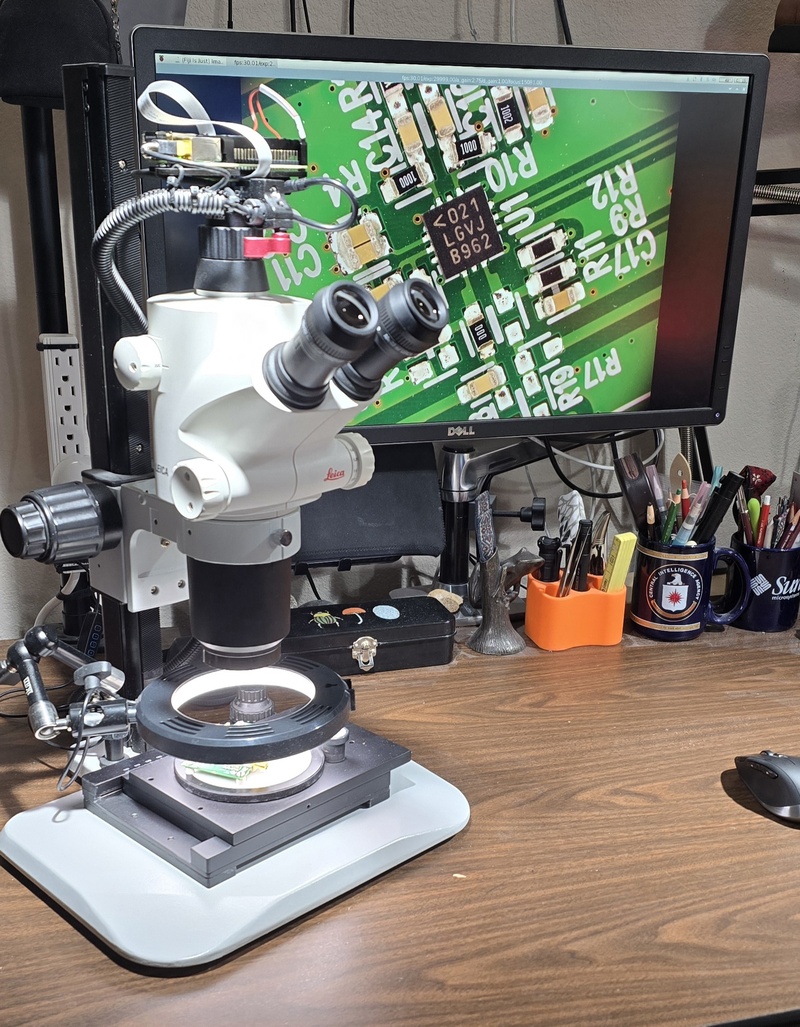
Figure 1: A 30fps live feed illuminated only by my desk lamps. This is an exceptionally bright microscope.
9.1. The Idea
If you have arrived here via direct link, then you might be interested to know that your browser is pointed to the middle of a larger document – my personal stereo microscope notes. While these are my personal notes, I have attempted to expand this section a bit to make it easier to follow for someone wishing to replicate my camera setup.
Microscope cameras with built in image analysis software are pretty cool. Simply connect the camera to your monitor & mouse, and you can do simple image processing and measurement without a computer. These solutions are expensive for what you get, and the analysis software is pretty limited. So I thought, why not build my own? It's just a tiny computer and a camera in a compact case after all. If I used a Raspberry Pi, then I could actually run my favorite image analysis software (Fiji/ImageJ) right on the camera.
9.2. Bill Of Materials
Note: I originally built this camera around 2021, so the hardware listed below is pretty old (Pi model 4). The good news is that the software components described later work on newer Raspberry PIs, so you should be able to make a version of this project with modern hardware without too much difficulty.
| Item | Price (US $) |
|---|---|
| Raspberry Pi 4 Model B - 8 GB RAM | 75 |
| Raspberry Pi 4 Pro Mounting Plate for HQ Camera | 7 |
| Heatsink Raspberry Pi 4 Case with Dual Fans (NOTE) | 26 |
| Raspberry Pi High Quality HQ Camera - 12MP | 50 |
| MicroSD Card | 15 |
| Micro HDMI to HDMI Cable | 12 |
| CanaKit RPI 4 Power Supply with PiSwitch | 11 |
| Total | 196 |
9.3. Wire Management
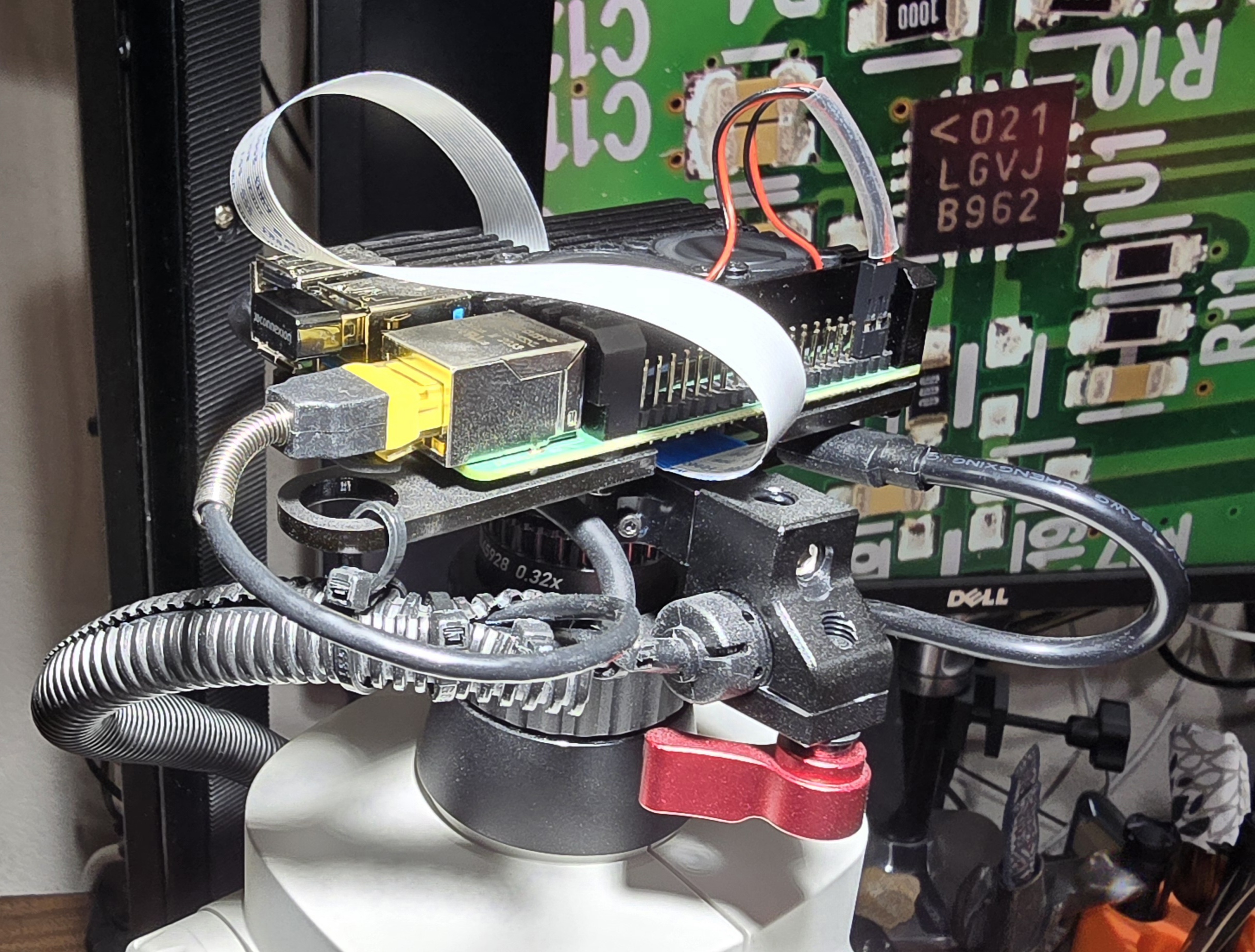
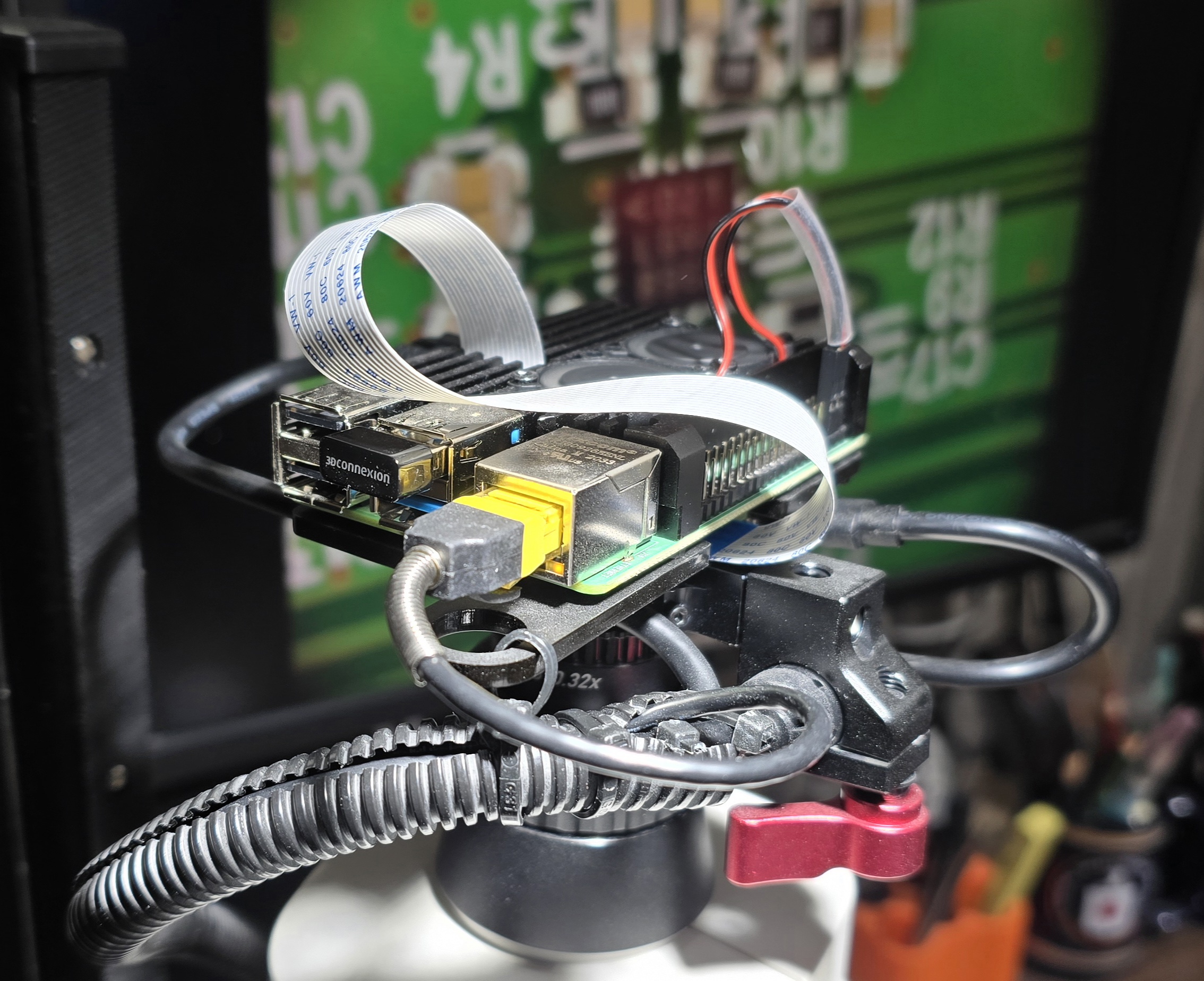
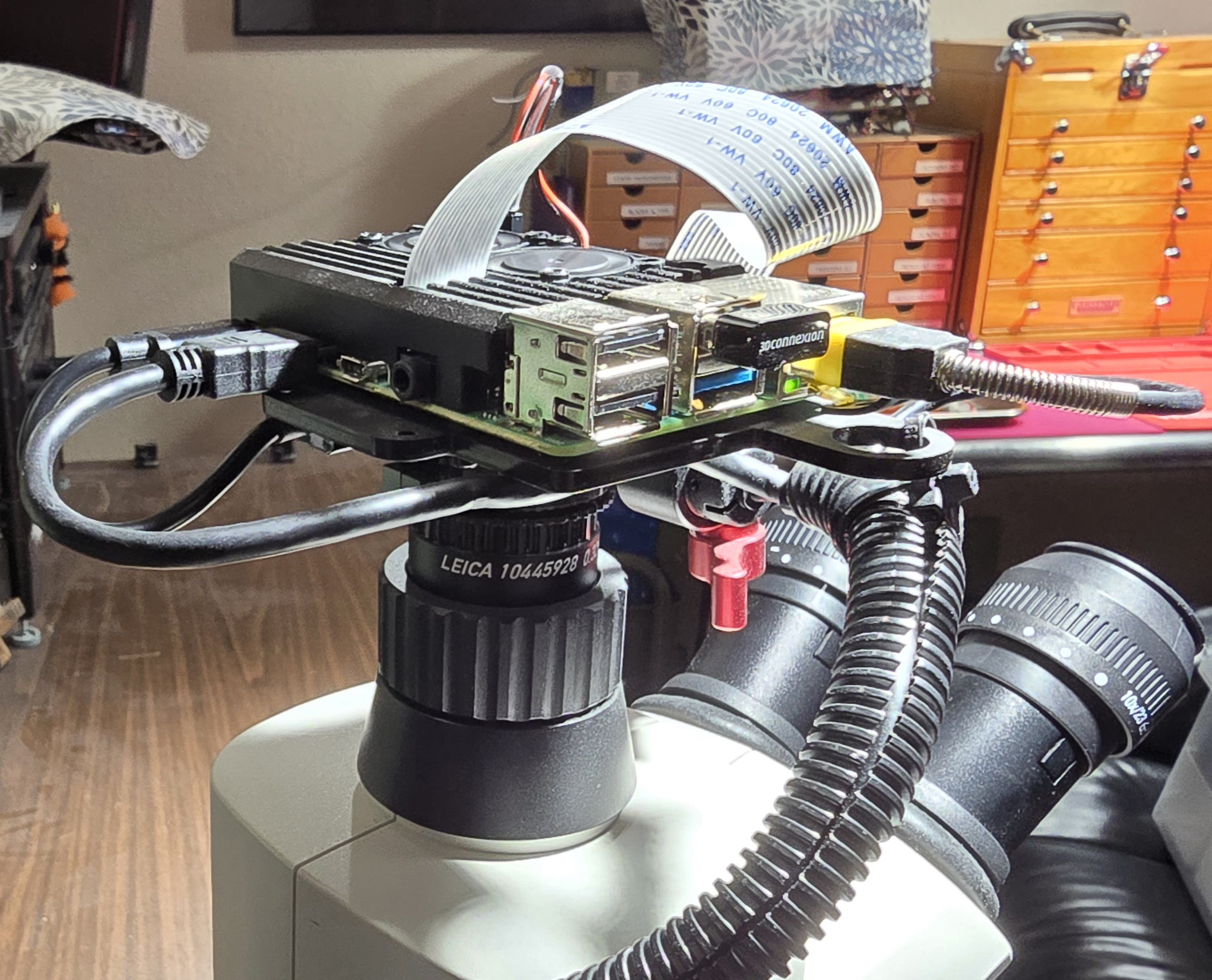
I like to be able to move the microscope around on my desk, so I have the whole thing on Teflon glider feet. This makes wire management a bit tricky. The power cable I purchased is quite sturdy and has a large EMI filter choke that's about the 10mm in diameter. I decided to use this as my primary cable mount point by clamping the choke into a small camera rig pipe mount which I connected to the 1/4" photographic mounting hole on the camera ring. I then routed all the wires parallel to the power cable, and encased them in a wire tube. I also added a couple zip-ties to secure the wire tube to the camera plate. The whole thing is pretty resilient.
9.4. Wired Ethernet vs. WiFi
It's more than reasonable to use WiFi for this setup; however, things like software updates are a little slow. In the end I decided to use this super thin Ethernet cable I had in the cable box. Honestly if I hadn't had that cable laying around I probably would have stuck with WiFi.
9.5. Cooling Fan & Heat Sink Case
The fan is pretty unnecessary in my experience, and I generally keep it disconnected. The Pi can display a streaming view from the camera for hours without the temperature ever going over 50C in my lab (I keep the lab at about 20C).
If I were going to build this again, I would probably use the version of the case without the fan and save a couple dollars.
9.6. System Setup
First the Raspberry Pi must be configured – the OS installed & configured. The best place to start with that is probably the official "getting started" documentation.
The instructions below describe the next step of installing and configuring the camera related software. Note the following instructions are for the Debian Trixie (version 13) based Raspberry Pi OS released in October of 2025.
9.6.1. Minimal Configuration
The following steps should work for most people out of the box. The only tricky bit is Fiji because it is such a dynamic project, and things change over time.
#### Install camera packages
sudo apt install -y libcamera-apps libcamera-dev rpicam-apps
#### Make sure we are in our home direcotory!
cd ~
#### Download Fiji software
test -e fiji-latest-linux-arm64-jdk.zip || wget 'https://downloads.imagej.net/fiji/latest/fiji-latest-linux-arm64-jdk.zip'
#### Unpack Fiji
unzip fiji-latest-linux-arm64-jdk.zip
#### If necessary, sync GIT repos from github.
if [ ! -e ~/world/my_prog/imagej/PhilaJ-and-RPI_Tools/ ] ; then
  git clone 'https://github.com/richmit/microscope.git'
  git clone 'https://github.com/richmit/imagej.git'
fi
#### Link the RPI_tools & optionally PhilaJ.ijm into Fiji
rm -f ~/Fiji/macros/toolsets/RPI_tools.ijm ~/Fiji/macros/toolsets/PhilaJ.ijm
if [ -e ~/world/my_prog/imagej/PhilaJ-and-RPI_Tools/ ] ; then
  ln -s ~/world/my_prog/imagej/PhilaJ-and-RPI_Tools/RPI_tools.ijm ~/Fiji/macros/toolsets/RPI_tools.ijm
  ln -s ~/world/my_prog/imagej/PhilaJ-and-RPI_Tools/PhilaJ.ijm    ~/Fiji/macros/toolsets/PhilaJ.ijm
else
   ln -s ~/imagej/PhilaJ-and-RPI_Tools/RPI_tools.ijm ~/Fiji.app/macros/toolsets/RPI_tools.ijm
   #### If you are a postage stamp collector, then you may want to also install PhilaJ
   #ln -s ~/imagej/PhilaJ-and-RPI_Tools/PhilaJ.ijm    ~/Fiji/macros/toolsets/PhilaJ.ijm
fi
#### Run Fiji and update
~/Fiji/fiji
9.6.2. My Configuration
Most Unix/Linux users have pretty strong opinions on how to setup a personal working environment. This section documents my personal configuration. I preform these steps before I do the stuff in the section Minimal Configuration.
- I have a bunch of stuff in my home directory I sync (via rsync) from my primary workstation.
- I like to have
ruby,perl, &sbckin/usr/local/bin/so scripts will work that refrnece those locations. - My dot files and
~/binare automatically configured viaSelectSetup.rb&SetupBin.rb. - My preferred user name is '
richmit'. - My preferred shell is '
zsh'. - Quite a bit more apt installed software (Emacs, sbcl, maxima, gnuplot, paraview, etc…)
9.6.2.1. System Setup
#### DO: Setup ssh (put pi-cam public key in .ssh directory)
#### Install my favorite  packages
sudo apt install -y emacs gnuplot maxima sbcl telnet zsh tmux gitk xterm imagemagick nomacs gimp ruby exiv2 git openssl
#### Make /usr/local links
for f in ruby perl sbcl; do
  if [ -e /usr/bin/$f ]; then
    sudo ln -s /usr/bin/$f /usr/local/bin/$f
  else
    echo Missing: /usr/bin/$f
  fi
done
#### Change my shell
sudo usermod -s /usr/bin/zsh richmit
#### Change root's password
sudo passwd root
#### Setup directories & links in $HOME
cd ~
for d in ~/bin ~/tmp/tmux/sockets ~/Pictures/pi-cam ~/synced/core/ ~/synced/Doc2/gadgets/leica_microscopes/; do
  mkdir -p $d
done
for d in pi-data/ dotfiles/ dotfilesSecure/ stuff/homeNetwork/ stuff/notes/ my_prog/learn/ex-ruby/              \
         my_prog/microscope/ my_prog/debianPackageTools/ my_prog/tmuxStuff/ my_prog/UNIXutils/ my_prog/utils/ \
         my_prog/ImageJ my_prog/mpms my_prog/dir-inventory/ stuff/my_ref/ my_prog/lispStuff/lispy/;             do
  mkdir -p ~/synced/world/$d
done
#### Make links to synced dirs
ln -s ~/synced/world ~/world
ln -s ~/synced/core ~/core
#### DO: Sync data from laptop via rsync
#### Setup dotfiles & ~/bin
./world/my_prog/UNIXutils/SelectSetup.rb --loc=HOME; ./world/my_prog/UNIXutils/SetupBin.rb
#### DO: Reboot
9.6.2.2. System Sync
I frequently sync my primary workstation with the pi-cam. The sync is bidirectional pulling data from the RPI (captured images & data) to my workstation,
and to the RPI (scripts & config). I sync over the network using rsync via ssh. The commands below are executed on my primary workstation.
date; echo back-dat-sync;        rsync -rlt --log-format=%f --delete --delete-excluded --modify-window=2                  --rsh='ssh' pi-cam:synced/pi-data/                                       /c/Users/richmit/Documents/world/pi-cam/;
date; echo back-pic-sync;        rsync -rlt --log-format=%f                            --modify-window=2                  --rsh='ssh' pi-cam:Pictures/pi-cam/                                      /c/Users/richmit/Pictures/pi-cam/;
date; echo microscope-code;      rsync -rlt --log-format=%f --delete --delete-excluded --modify-window=2 --exclude '.git' --rsh='ssh' /c/Users/richmit/MJR/world/my_prog/microscope/               pi-cam:synced/world/my_prog/microscope/;
date; echo imagej-code;          rsync -rlt --log-format=%f --delete --delete-excluded --modify-window=2 --exclude '.git' --rsh='ssh' /c/Users/richmit/MJR/world/my_prog/imagej/                   pi-cam:synced/world/my_prog/imagej/;
date; echo dotfiles;             rsync -rlt --log-format=%f --delete --delete-excluded --modify-window=2 --exclude '.git' --rsh='ssh' /c/Users/richmit/MJR/world/dotfiles/                         pi-cam:synced/world/dotfiles/;
date; echo dotfilesSecure;       rsync -rlt --log-format=%f --delete --delete-excluded --modify-window=2 --exclude '.git' --rsh='ssh' /c/Users/richmit/MJR/world/dotfilesSecure/                   pi-cam:synced/world/dotfilesSecure/;
date; echo homeNetwork;          rsync -rlt --log-format=%f --delete --delete-excluded --modify-window=2 --exclude '.git' --rsh='ssh' /c/Users/richmit/MJR/world/stuff/homeNetwork/                pi-cam:synced/world/stuff/homeNetwork/;
date; echo my_ref;               rsync -rlt --log-format=%f --delete --delete-excluded --modify-window=2 --exclude '.git' --rsh='ssh' /c/Users/richmit/MJR/world/stuff/my_ref/                     pi-cam:synced/world/stuff/my_ref/;
date; echo notes;                rsync -rlt --log-format=%f --delete --delete-excluded --modify-window=2 --exclude '.git' --rsh='ssh' /c/Users/richmit/MJR/world/stuff/notes/                      pi-cam:synced/world/stuff/notes/;
date; echo mpms;                 rsync -rlt --log-format=%f --delete --delete-excluded --modify-window=2 --exclude '.git' --rsh='ssh' /c/Users/richmit/MJR/world/my_prog/mpms/                     pi-cam:synced/world/my_prog/mpms/;
date; echo mpms;                 rsync -rlt --log-format=%f --delete --delete-excluded --modify-window=2 --exclude '.git' --rsh='ssh' /c/Users/richmit/MJR/world/my_prog/verGo/                    pi-cam:synced/world/my_prog/verGo/;
date; echo dir-inventory;        rsync -rlt --log-format=%f --delete --delete-excluded --modify-window=2 --exclude '.git' --rsh='ssh' /c/Users/richmit/MJR/world/my_prog/dir-inventory/            pi-cam:synced/world/my_prog/dir-inventory/;
date; echo ruby-examples;        rsync -rlt --log-format=%f --delete --delete-excluded --modify-window=2 --exclude '.git' --rsh='ssh' /c/Users/richmit/MJR/world/my_prog/learn/ex-ruby/            pi-cam:synced/world/my_prog/learn/ex-ruby/;
date; echo lispy;                rsync -rlt --log-format=%f --delete --delete-excluded --modify-window=2 --exclude '.git' --rsh='ssh' /c/Users/richmit/MJR/world/my_prog/lispStuff/lispy/          pi-cam:synced/world/my_prog/lispStuff/lispy/;
date; echo line-sets;            rsync -rlt --log-format=%f --delete --delete-excluded --modify-window=2 --exclude '.git' --rsh='ssh' /c/Users/richmit/MJR/world/my_prog/lineSets/                 pi-cam:synced/world/my_prog/lineSets/;
date; echo debianPackageTools;   rsync -rlt --log-format=%f --delete --delete-excluded --modify-window=2 --exclude '.git' --rsh='ssh' /c/Users/richmit/MJR/world/my_prog/debianPackageTools/       pi-cam:synced/world/my_prog/debianPackageTools/;
date; echo tmuxHelper;           rsync -rlt --log-format=%f --delete --delete-excluded --modify-window=2 --exclude '.git' --rsh='ssh' /c/Users/richmit/MJR/world/my_prog/tmuxHelper/               pi-cam:synced/world/my_prog/tmuxHelper/;
date; echo UNIXutils;            rsync -rlt --log-format=%f --delete --delete-excluded --modify-window=2 --exclude '.git' --rsh='ssh' /c/Users/richmit/MJR/world/my_prog/UNIXutils/                pi-cam:synced/world/my_prog/UNIXutils/;
date; echo utils;                rsync -rlt --log-format=%f --delete --delete-excluded --modify-window=2 --exclude '.git' --rsh='ssh' /c/Users/richmit/MJR/world/my_prog/utils/                    pi-cam:synced/world/my_prog/utils/;
date; echo core;                 rsync -rlt --log-format=%f --delete --delete-excluded --modify-window=2 --exclude '.git' --rsh='ssh' /c/Users/richmit/MJR/core/                                   pi-cam:synced/core/;
date; echo leicaS8APO-docs;      rsync -rlt --log-format=%f --delete --delete-excluded --modify-window=2 --exclude '.git' --rsh='ssh' /c/Users/richmit/MJR/reading/Doc2/gadgets/leica_microscopes/ pi-cam:synced/Doc2/leica_microscopes/;
date
9.7. RPI Software
My goals:
- Capture images directly from ImageJ/Fiji so I can immediately preform an image analysis
- Setting image scale needs to be easy because measuring lengths is my #1 application
- Identical UI between Windows and RPI
- The software should be fully integrated into PhilaJ (an extensive set of ImageJ/Fiji macros for philatelic image analysis)
- The microscope functionality should be available without the bulk of the PhilaJ user interface for people not interested in philately.
- Optionally show a preview before capture
- See a live view from the camera & control the size of the preview
- Capture sequences of related images, and name so they are grouped together
- Put captured images in a known directory with a standard naming convention so that it is simple to orginize and sync data between camear and computers
The ImageJ/Fiji toolset, called "RPI_tools", is actually a direct copy my "PhilaJ" software with an alternative, stripped down user interface that only
exposes the microscope functionality. That is to say, the only difference between "RPI_tools" and "PhilaJ" is the ImageJ/Fiji toolset code the exposes
the functionality to the end user. Full documentation may be found here:
https://richmit.github.io/imagej/PhilaJ.html#rpi-tools
The setup instructions above install this package into Fiji. You can find the code on github: