mrSCPI
Instrument Control Software
| Author: | Mitch Richling |
| Updated: | 2026-10-08 12:37:48 |
| Generated: | 2026-10-08 12:37:49 |
Copyright 2026 Mitch Richling. All rights reserved.
Table of Contents
1. Introduction
From the README:
mrSCPIis a software tool for controlling programmable test equipment; however, I think ofmrSCPIas more of a test bench productivity tool.From a software/hardware architectural perspective, programmable test equipment is designed in such a way so as to make very complex test automation possible. Systems designed from the ground up to support very complex use cases frequently overly complicate things for people with simple use cases. Larry Wall captured the phenomenon quite clearly when he said:
Perl makes easy things easy and hard things possible.
Professional programming languages tend to make all things equally difficult.
mrSCPIaims to make it possible to easily integrate test equipment automation into my day to day bench workflow. The goal is to make it so easy that I use it even for the hundreds of tiny, repetitive tasks I preform at the bench.If you are wondering if
mrSCPIis for you, that emphasized "my" is a warning!mrSCPIis very much designed around my personal workflow and tool preferences. I very much like command line tools with UNIX'ish interfaces. If this sounds like you, thenmrSCPImight be for you. OTOH, if you were looking for a nice GUI to control your equipment, then you will most likely be quite disappointed withmrSCPI.Lastly,
mrSCPIis simple to set-up so I can run it anyplace. It has no dependencies beyond a standard Ruby install. No drivers. No modules. No packages. No PIPs. No GEMs. Nothing to compile. Just a single script – yes, the library and the executable are the same file!Links:
- Documentation: https://richmit.github.io/mrSCPI/index.html
- RDoc API Documentation: https://richmit.github.io/mrSCPI/rdoc/index.html
- Additional examples: https://github.com/richmit/TestEquipmentScripts
- Github repo: https://github.com/richmit/mrSCPI
- Changelog: https://richmit.github.io/mrSCPI/changelog.html
2. Interfaces
The mrSCPI ecosystem provides three distinct ways to control SCPI instruments:
- Ruby API (See the Ruby API section for more detail)
- For complex test automation requiring a real programming language.
This stateful API is unlike most test automation APIs and naturally compliments the way many
SCPItasks are preformed … Or at least the way I tend to useSCPI.;)
require_relative 'mrSCPIlib'
SCPIsession.new(:url => '@tek2k',
                :cmd => '*IDN?')
mrSCPI.rbcommand- A CLI command providing sophisticated
SCPIfunctionality from the command line – a bit like lxi-tools.
mrSCPI.rb --url @tek2k --cmd '*IDN?'
mrSCPIScripts (See the Scripts section for more detail)- An efficient scripting language for simple
SCPItasks. Full Emacsorg-modeBabel support is included enabling instrument control right from your laboratory notebook!
:url @tek2k
:cmd *IDN?
All of these methods use the same underlying infrastructure, and mirror each other in the way they work. So if you learn how to use one of them, you have learned how to use them all.
3. Emacs as a mrSCPI Interface
If you don't have any interest in Emacs, then feel free to skip this section.
mrSCPI really has nothing to do with Emacs; however, as an enthusiastic Emacs user, I wanted to be able to use mrSCPI from inside
Emacs! To that end I have developed a bit of Emacs software to seamlessly integrate mrSCPI into Emacs. For me, because Emacs
plays a central role in my workflow, this is one of the most important aspects of mrSCPI – 90% of my mrSCPI use is from within Emacs. This
section provides some insight into my workflow. If you are not interested in Emacs, then you can safely skip this section.
3.1. The Laboratory Notebook
I always have my laboratory notebook open at the bench – just an org-mode document loaded up in Emacs running on my bench computer. I have
implemented a major mode for mrSCPI scripts as well as org-mode Babel support. This allows me to embed SCPI commands right inside my notes
making those notes EXECUTABLE. Here is an example excerpt from one of my notebooks:
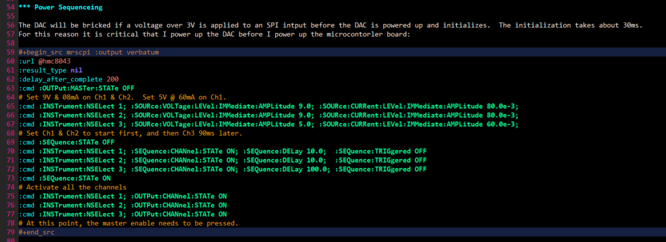
To make this sort of thing effortless, I have a few scripts that capture instrument configuration details and insert them into my org-mode notebook.
Then, when I come back to my experiment some time later, I can have org-mode reconfigure all the equipment on my bench to where I left off.
3.2. Test Equipment Notes & Macro Buttons
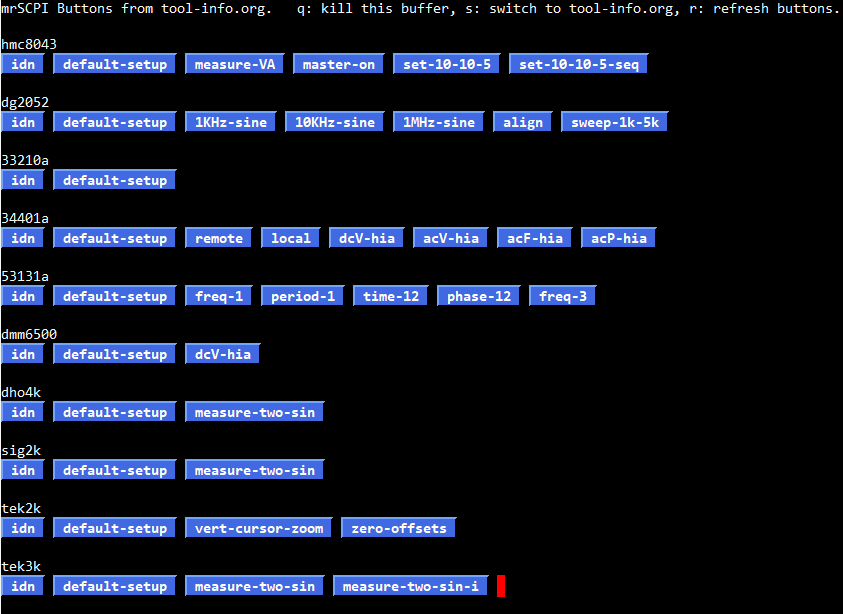
I keep general test equipment notes in a couple org-mode files. Of course I include in my notes little bits of mrSCPI script code for common
things I do with my test equipment. I could simply put my cursor on those code bits in org-mode and execute them, but I wanted a quicker way to access
these code snippets. So I added an Emacs function that finds all the mrSCPI code bits in an org-mode document, and produces a GUI window full
of buttons to run them. This has proven to be super handy, and saves me a ton of time at the bench. Here is an example of one of my button buffers:
3.3. Integrated Data Capture and Analysis

3.4. Setting Up Emacs
The mrSCPI Emacs support package along with installation instructions may be found here: mrscpi-in-emacs
4. Ruby API
4.1. API Structure & Philosophy
In essence any SCPI program is about managing a communication session state between computer and instrument. The heart of mrSCPI is the
SCPIsession class which encapsulates and manages session state. Session state is represented by named parameters (key-value
pairs). For example the parameter :ip_address stores the IP address for the connection. As another example, the :print_results parameter stores a
boolean value that determines if the results from SCPI commands will be printed. A few parameters, like :ip_address, may only be set when the
SCPIsession is created. Other parameters, like :print_results may be freely changed at any time. Parameters are sticky
in that they stay in effect until changed. Using the API always follows the same basic outline:
- Create an
SCPIsessionobject (The:url,:ip_address,:net_protocol, and:net_portparameters are used by new). - Set parameters regarding how we wish to run
SCPIcommands and what to do with the results. - Set the
:cmdparameter to execute anSCPIcommand. - Go back to 2) till everything is done
See the documentation for the SCPIsession class for information about all the parameters.
4.2. Example
In the following example, we run the *IDN? command on my DMM. This is about the simplest thing we can do with mrSCPI – a single instrument
connection through which we send a single command.
# Search for mrSCPI.rb on my shell PATH variable and load it up.
require ENV['PATH'].split(File::PATH_SEPARATOR).map {|x| File.join(x, 'mrSCPI.rb')}.find {|x| FileTest.exist?(x)}

theSPCIsession = SCPIsession.new(:url => '@33210a',   # Connect using "nickname" to my DMM
                                 :cmd => "*IDN?")     # Send the *ION command to the instrument

puts("The Result: #{theSPCIsession.result.inspect}")  # Print out what we received
All the magic is in the SCPIsession.new call:
- First we tell it where to connect with
:url. - Lastly we tell it the command to use.
Source code: idn.rb.
5. mrSCPI Scripts & One Liners
Even if you only want to know about scripts, I encourage you to read the section on Ruby API Structure & Philosophy.
5.1. mrSCPI Script Example
To begin, here is a mrSCPI script that mirrors the example Ruby script given above.
:url @34401a  # @34401a is an instrument connection "nickname" for my DMM
:cmd *IDN?    # Run the *IDN? command
Notice how the code parallels the Ruby script above; however, there is one important difference – we don't need to explicitly print out
the result from the command. When run in "script mode", mrSCPI echos the command and result to STDOUT. From an API standpoint, this means the
following three parameters have different default values:
| parameter | script mode | Library mode |
|---|---|---|
:print_result |
true | false |
:print_result_puts |
true | false |
:print_cmd |
true | false |
We can adjust the Ruby example above to work in the same way:
require ENV['PATH'].split(File::PATH_SEPARATOR).map {|x| File.join(x, 'mrSCPI.rb')}.find {|x| FileTest.exist?(x)}

theSPCIsession = SCPIsession.new(:url  => '@33210a',   # Connect using "nickname" to my DMM
                                 :echo => true,        # Automatically print command and result
                                 :cmd  => "*IDN?")     # Send the *ION command to the instrument
Source code: idn_echo.rb.
Notice the addition of the :echo parameter (which sets :print_result, :print_result_puts, & :print_cmd at one time). Also note that we have removed
the puts call in the previous example.
5.2. Running mrSCPI Scripts
Note the shebang line (#!/usr/bin/env -S mrSCPI.rb -f) in the first script example. This is how we make a mrSCPI script
executable on the command line – just like a shell script. From the For example directory, we can run this script in a shell like this:
./idn_echo.mrscpi
We can also run scripts by invoking mrSCPI directly and using the -f option like so:
mrSCPI.rb -f idn.mrscpi
Note that scripts can also be provided on STDIN. If we continue with the previous example, then here is another way to run the script:
mrSCPI.rb -f STDIN <idn.mrscpi
5.3. Running mrSCPI One Liners
Scripts can be described on the command line with arguments instead of being put in a script file – something of an extension of the traditional UNIX "one
liner script" concept. For the most part we replace the mrSCPI script commands with arguments of the same name. Notice that it parallels
first script example above:
mrSCPI.rb --url @34401a --cmd '*IDN?'
Note the quotes on the command are required because the asterisk (*) and question mark (?) have special meaning for the shell.
5.4. mrSCPI Combining Scripts & One-Liners (Command Line Arguments)
What if you wanted to make the URL part of mrSCPI script be passed from the command line. You could resort to using a one-liner, but mrSCPI
provides another way. mrSCPI has the ability to combine one-liner commands with commands found in a script file. When we do this it is as if we
prepend the script file with the commands given on the command line. One thing to note is that the first :url option will override any subsequent instances
– this is also true for :ip_address, :net_port, & :net_protocol as well. For example we could do something like this to connect to an alternate DMM:
./idn_echo.mrscpi --url @dmm2
A common technique is to parameterize things with variables, provide default values for the variables in the script, and then override one or more variables on the command line. For example, suppose we wish to set our power supply up with the first two channels providing analog voltage rails and the third channel providing a voltage for a microcontroller. We might use a script like the following:
:url @hmc8043
:result_type nil
:delay_after_complete 100
:cmd :OUTPut:MASTer:STATe OFF'
:cmd :INSTrument:NSELect 1; :SOURce:VOLTage:LEVel:IMMediate:AMPLitude ${analog_voltage:10}; :OUTPut:CHANnel:STATe ON
:cmd :INSTrument:NSELect 2; :SOURce:VOLTage:LEVel:IMMediate:AMPLitude ${analog_voltage:10}; :OUTPut:CHANnel:STATe ON
:cmd :INSTrument:NSELect 3; :SOURce:VOLTage:LEVel:IMMediate:AMPLitude ${digital_voltage:5}; :OUTPut:CHANnel:STATe ON
Source code: power_setup.mrscpi.
mrSCPI.rb -D analog_voltage=15 -D digitial_voltage=3.3 power_setup.mrscpi
If we wanted the default values, then we could have just used this:
mrSCPI.rb -f power_setup.mrscpi
Inside of Emacs in an org-mode code block, we could set these variables via the src header arguments like so:
#+begin_src mrscpi :output verbatum :var analog_voltage="15" digitial_voltage="3.3"
Note that the "new" commands (:url, :ip_address, :net_port, & :net_protocol) can not be parameterized with variables, but they can be overridden.
5.5. mrSCPI Script Syntax
mrSCPI scripts and one-liners construct an SCPIsequence object in the background. SCPIsequence objects provide a container
mrSCPI for a script/one-liner object. As such mrSCPI scripts may contain constructions and syntax that is not part of
the SCPIsession object:
- Infrastructure to parse
mrSCPIscripts into Ruby objects. - Simple conditionals and loops.
- Ruby expression parsing and evaluation.
- Variable interpolation.
This example runs *IDN?, and performs different actions based on the result (illustrating conditionals & variable interpolation):
:url @34401a                      # @34401a is an instrument connection "nickname"
:name ids                         # We name the next :cmd that will run
:cmd *IDN?                        # Creates ids variable and stores command result in it
:skip_if ${ids}~34401[aA]         # Checks the result against a regular expression, and skips the next command if it matches
:stop Unknown Device: ${ids}      # This line is skipped if the previous one was true.  Note :stop ends the script.
:print Known Device: 34401A       # The normal script end -- when the regex above matches indicating a recognized device
Source code: conditional.mrscpi.
This example we construct a filename based on today's date and then store an oscilloscope screenshot in the file (illustrating Ruby code evaluation & variable interpolation):
:url @dho4k                                                                # Connect to my DHO4k
:eval imgFileName=Time.now.localtime.strftime('%Y%m%d%H%M%S') + "_DHO.png" # Filename for PNG
:result_macro_block true                                                   # Expect/Extract a block
:echo false                                                                # Do not echo the command
:out_file ${imgFileName}                                                   #   into a filename
:cmd :DISPlay:DATA? PNG                                                    # Send the command
Source code: dho4ksc.mrscpi.
The entirety of mrSCPI script syntax may be compactly stated:
Each line of a
mrSCPIscript with anmrSCPIcommand, and each command is a parameter for one of the following classes:Syntax for the command arguments is completely defined by the
@optValToStrmember ofSCPIsequence.
6. mrSCPI Library Use Vs. mrSCPI Scripts
If all we need to do is execute a simple list of linear SCPI commands on a instrument, then a mrSCPI script or one-liner is probably the most
direct option. If the application requires complex logic, sophisticated data structures, or involved calculations; then using a Ruby script and SCPI as a
library is usually the best choice. Between these two extremes, the choice between using mrSCPI as a library required by a Ruby script vs a
mrSCPI script is largely up to personal preference.
Passing IEEE-488.2 binary block format data as SCPI command arguments is an example of something that is much easier to do when using Ruby directly. This is
because in library mode we can pass parameters directly to an SCPIsession object as native Ruby types. This makes library
mode a bit more flexible from a data processing perspective.
In the code below we provide 8192, 14-bit sample points as an IEEE-488.2 binary data block containing 16-bit integers to an Agilent 33210A arbitrary waveform generator. This function generator can accept ASCII formatted floats, ASCII formatted integers, and binary integers. With only 8k points there isn't much practical benefit to using binary mode, but it gives us a nice way to demonstrate how to do so with mrSCPI!
require ENV['PATH'].split(File::PATH_SEPARATOR).map {|x| File.join(x, 'mrSCPI.rb')}.find {|x| FileTest.exist?(x)}

# Number of data points for our curve.
size = 8192

if (size < 1) then
  STDERR.puts("ERROR: Data size too small!")
  exit
elsif (size > 8192) then
  STDERR.puts("ERROR: Data size too big!!")
  exit
end

# Populate floating point data: fdata
# We evaluate |sin(t)| over [0, 2pi].
fdata = Array.new(size)
fdata.each_index do |i|
  fdata[i] = (Math.sin(2 * Math::PI * i.to_f / size.to_f)).abs
end

# Populate short integer data: sdata
# We convert and scale the data in fdata, and store it in sdata.
fmin = fdata.min
fmax = fdata.max

bmin = -8191
bmax =  8191

if ((fmax - fmin) < 1.0e-8) then
  STDERR.puts("WARNING: Curve is constant.")
  m = 0
  b = 0
else
  m = (bmax - bmin).to_f / (fmax - fmin)
  b = bmax.to_f - m * fmax
end

sdata = Array.new(size)
fdata.each_with_index do |v, i|
  sdata[i] = [[(m * v + b).to_i, bmax].min, bmin].max
end

# Construct a string with the contents of the IEEE-488.2 binary block with our waveform data.
blen    = (size * 2).to_s
blenlen = blen.length.to_s
bdata   = "#" + blenlen + blen + sdata.pack('n*')

# Send everything to the device
theSPCIsession = SCPIsession.new(:url         => '@33210a',   # Change for your instrument's IP address
                                 :result_type => nil)         # None of the following commands have any output to capture
theSPCIsession.set({:cmd => '*RST'})                          # Reset the unit to defaults.
theSPCIsession.set({:cmd => ':DATA:DAC VOLATILE, ' + bdata }) # Send our data
theSPCIsession.set({:cmd => ':FUNCtion:USER VOLATILE'})       # Set the ARB waveform to 'VOLATILE'.
theSPCIsession.set({:cmd => ':APPLy:USER 2000,4,0'})          # 2 kHz, 4 Vpp, 0 V offset
Source code: bin_scpi_arg.rb.
7. SCPIrcFile Class
mrSCPI can use a configuration file to keep track of things like IP addresses, port numbers, protocols, and firewall details. The
SCPIrcFile class is the primary interface to the information in the RC file. For the details, see the class
documentation.
7.1. Simple RC file
Here is an example of a very simple RC file with four devices (an HP universal counter, Agilent arbitrary waveform generator, a Keysight DMM, and a Tektronix
oscilloscope) each using a different connection protocol (Prologix Ethernet to GPIB, raw TCP/IP sockets, Serial over TCP/IP, and T4K – a specialized HTTP
mode for TDS3000B scopes). This configuration has no network subnet configuration at all. Two nicknames are provided for each address – the first being the
equipment model number (like 53131a or tds3000b) and the second being more descriptive (counter, awg, dmm, oscope).
nickname 53131a   counter => plgx://gpib-rover.home.mitchr.me:1234
nickname 33210a   awg     =>  raw://awg-agilent.home.mitchr.me:5025
nickname 34401a   dmm     => soip://serial.home.mitchr.me:10001
nickname tds3052b oscope  =>  t3k://oscope-tek.home.mitchr.me:80
7.2. My RC file
My home network has the following configuration:
- Everything on my bench is in the 172.16.3.X subnet.
- Everything on my computer desk is in the 172.16.1.X subnet.
- Equipment on the bench is allowed to communicate with each other.
- Systems on the computer desk are allowed to communicate to bench equipment.
- The only bench access provided outside these two subnets is via an SSH bastion server using SSH tunnels.
So when I'm at my bench or computer desk I can access the test equipment directly – for example I can access my AWG directly via
raw://awg-agilent.home.mitchr.me:5025. When I'm anyplace else on my home network I need to use an SSH tunnel – for example I can access my AWG through an
SSH tunnel via raw://127.0.0.1:9001. The mrSCPI RC file allows us to define alternate addresses for instruments based upon which network from which
we are connecting. So with mrSCPI I can always use the alias "33210a" to connect to my AWG regardless of where I'm running the script.
I actually generate this configuration file via a bit of code inside the org-mode document for my Test Equipment Notes.
#####################################################################################################################
# SCPI Nicknames ####################################################################################################
#........CNAME......nicknames.................Directly Connected Network....................ssh to bench-pi...........
nickname 33210ae    33210a    aawge  aawg  => direct@raw://awg-agilent.home.mitchr.me:5025  ssh@raw://127.0.0.1:9001
nickname 33210aw              aawgw        => direct@https://awg-agilent.home.mitchr.me:443 ssh@https://127.0.0.1:9002
nickname 34401ap              dmmp         => direct@plgx://gpib-rover.home.mitchr.me:1234  ssh@plgx://127.0.0.1:9003
nickname 34401as    34401a    dmms   dmm   => direct@soip://serial.home.mitchr.me:10001     ssh@soip://127.0.0.1:9004
nickname 53131ap    53131a    countp count => direct@plgx://gpib-rover.home.mitchr.me:1234  ssh@plgx://127.0.0.1:9005
nickname dg2052e    dg2052    dg2ke  dg2k  => direct@raw://awg-rigol.home.mitchr.me:5555    ssh@raw://127.0.0.1:9006
nickname dg2052w              dg2kw        => direct@http://awg-rigol.home.mitchr.me:80     ssh@http://127.0.0.1:9007
nickname dho4204e   dho4204   dho4ke dho4k => direct@raw://oscope-rigol.home.mitchr.me:5555 ssh@raw://127.0.0.1:9008
nickname dho4204w             dho4kw       => direct@http://oscope-rigol.home.mitchr.me:80  ssh@http://127.0.0.1:9009
nickname dmm6500e   dmm6500   6500e  6500  => direct@raw://dmm-keithley.home.mitchr.me:5025 ssh@raw://127.0.0.1:9010
nickname dmm6500w             6500w        => direct@http://dmm-keithley.home.mitchr.me:80  ssh@http://127.0.0.1:9011
nickname hmc8043e   hmc8043   pse    ps    => direct@raw://ps-rns.home.mitchr.me:5025       ssh@raw://127.0.0.1:9012
nickname hmc8043w             psw          => direct@http://ps-rns.home.mitchr.me:80        ssh@http://127.0.0.1:9013
nickname sds2504xpe sds2504xp sig2ke sig2k => direct@raw://oscope-sig.home.mitchr.me:5025   ssh@raw://127.0.0.1:9014
nickname sds2504xpw           sig2kw       => direct@http://oscope-sig.home.mitchr.me:80    ssh@http://127.0.0.1:9015
nickname serialw              serial       => direct@http://serial.home.mitchr.me:80        ssh@http://127.0.0.1:9016
nickname tds2024s             tek2ks tek2k => direct@soip://serial.home.mitchr.me:10002     ssh@soip://127.0.0.1:9017
nickname tds3052bh  tds3052b  tek3kh tek3k => direct@t3k://oscope-tek.home.mitchr.me:80     ssh@t3k://127.0.0.1:9018
nickname tds3052bp            tek3kp       => direct@plgx://gpib-rover.home.mitchr.me:1234  ssh@plgx://127.0.0.1:9019
nickname tds3052bs            tek3ks       => direct@soip://serial.home.mitchr.me:10003     ssh@soip://127.0.0.1:9020
nickname tds3052bw            tek3kw       => direct@http://oscope-tek.home.mitchr.me:80    ssh@http://127.0.0.1:9021
nickname test                              => direct@raw://127.0.0.1:1234                   ssh@raw://127.0.0.1:1234

#####################################################################################################################
# Networks ##########################################################################################################
#.......Name...Subnet.Mask.....Comment...............................................................................
network direct 172.16.3.0/23   # Bench network with test equipment & bench-pi
network direct 172.16.1.0/23   # Computer desk beside bench
network ssh    172.16.2.0/24   # Isolated work network
network ssh    172.16.4.0/24   # Isolated office network
7.3. mrNetwork.rb
This script simply prints out the name of the current host's network as specified in the .mrSCPIrc file.
if ENV['MRSCPIPATH'] then                                # First look in MRSCPIPATH
  require File.join(ENV['MRSCPIPATH'], 'mrSCPI.rb')        # Note if MRSCPIPATH is set and require fails, then we want the script to fail!
else
  begin                                                  # Then look in path with the script is
    require_relative 'mrSCPI.rb'
  rescue LoadError
    begin                                                # Then look on LOADPATH
      require 'mrSCPI.rb'
    rescue LoadError                                     # Then look on PATH
      require ENV['PATH'].split(File::PATH_SEPARATOR).map {|x| File.join(x, 'mrSCPI.rb')}.find {|x| FileTest.exist?(x)}
    end
  end
end

puts(SCPIrcFile.instance.lookupNetwork.inspect)
Other than finding and loading mrSCPI, the source above only has one line of code that actually performs any work – the last line instantiates an
SCPIrcFile object and prints out the network name found in the RC file for the current host. For example, if we run
this script on my laptop, it will print "ssh" because that's what I've named the network in my personal .mrSCPIrc file:
../src/mrNetwork.rb
"ssh"
7.4. teAlias.rb
This script looks up connection information in the .mrSCPIrc file.
if ENV['MRSCPIPATH'] then                                # First look in MRSCPIPATH
  require File.join(ENV['MRSCPIPATH'], 'mrSCPI.rb')        # Note if MRSCPIPATH is set and require fails, then we want the script to fail!
else
  begin                                                  # Then look in path with the script is
    require_relative 'mrSCPI.rb'
  rescue LoadError
    begin                                                # Then look on LOADPATH
      require 'mrSCPI.rb'
    rescue LoadError                                     # Then look on PATH
      require ENV['PATH'].split(File::PATH_SEPARATOR).map {|x| File.join(x, 'mrSCPI.rb')}.find {|x| FileTest.exist?(x)}
    end
  end
end

if (ARGV.length < 1) || (ARGV.first.match(/^-+[hH]/)) then
  puts("USE: teAlias.rb [format] thingy")
  puts("       thingy is one of netqork@nickname, @nickname, or nickname")
  puts("         network is a network name in the mrSCPIrc file")
  puts("         nickname is a nickname name in the mrSCPIrc file")
  puts("       format is a format string for how to print the result. Default: '%u'")
  puts("         %s -- replaced by the scheme (http, https, soip, etc...)")
  puts("         %h -- replaced by the IP address or DNS name")
  puts("         %p -- replaced by the port number")
  puts("         %u -- replaced by the full URL")
  puts("       Example: telnet `teAlias '%h %p' @foobar`")
  puts("       Example: ssh `teAlias '-p %p %h' @foobar`")
  puts("       Example: chromium-browser `teAlias.rb @foobar`")
  puts("                Works because '%u' is the default format.")
  puts("")
  puts("See SCPIrcFile.lookupURLnickname for full details.")
  exit 0
elsif (ARGV.length == 1) then
  print(SCPIrcFile.instance.lookupURLnickname(ARGV[0]))
elsif (ARGV.length == 2) then
  urlBits = SCPIrcFile.instance.urlParser(ARGV[1])
  print(ARGV[0].gsub('%h', urlBits[:ip_address]).gsub('%s', urlBits[:net_protocol].to_s).gsub('%u', urlBits[:url]).gsub('%p', urlBits[:net_port].to_s))
end
For example, if I wanted to fire up my web browser and connect to my SDS 2504X+ oscope, I might do this on the command line (zsh):
edge $(teAlias.rb sds2504xpw)
8. Features
- Broad platform support: If Ruby works, then
mrSCPIshould work. - Modern Ruby API for interacting with instruments via SCPI with a stateful programming model complimenting the structure of
SCPIitself. - Simple
mrSCPIscripting language- All the goodness of the Ruby API, but for simple applications
- Usage that parallels how the Ruby API is used in practice
- Shebang support for "executable" scripts on UNIX/Linux/Windows MSYS2
- Support simple programming constructs (conditionals, looping, variables, etc…)
- Emacs
org-modeBabel support (both execution and header variables) - Emacs language mode (highlight
mrSCPIscript code & identify common syntax errors)
- Protocol/Communication Features
- Flexible timing control
- Delay after sending a command but before doing a read on the line
- Timeout to wait for a response to start
- Timeout to for more data after a successful read
- Delay before retrying an I/O operation
- Delay after a command is run and all I/O processed, but before returning a value (or running the next command)
- A set of standard post-processing steps for results
- Standard string processing operations:
- Chop (end of line characters)
- Trim whitespace
- Extract last word
- Extract a 488.2 binary block data payload
- Split into an array
- Binary data can be unpack'ed into native types
- Binary return blocks can be split into header and payload
- Strings can be split on commas, semicolons, whitespace, vertical whitespace, regular expressions, fixed strings, or character sets
- Compress sequences of one or more white-space characters into single spaces
- Convert results into numeric Ruby types
- Float or array of floats
- Integer or array of integers
- Boolean or array of booleans (actually tri-state: true, false, or nil)
- Standard string processing operations:
- Global Configuration File
- Keeping track of instrument IP addresses or DNS names
- Keeping track of port mappings so I can get through the firewall isolating my bench
- Avoiding the need to type full DNS names or IP addresses
- A library of regular expression strings for matching 488.2 results and program elements
9. FAQ
9.1. Why don't you use a simple require to load mrSCPI in Ruby scripts?
In my scripts, I normally load mrSCPI by searching my PATH environment variable like this:
require ENV['PATH'].split(File::PATH_SEPARATOR).map {|x| File.join(x, 'mrSCPI.rb')}.find {|x| FileTest.exist?(x)}
Why? I normally put mrSCPI on my path, but I don't want to contaminate my Ruby LOAD_PATH by including a generic bin directory. This is just a
personal preference in the way I set up my operating environment. I expect most people will use something like the following to load mrSCPI:
require_relative 'mrSCPI.rb'
For the scripts shipped in the src directory I do something quite elaborate allowing much more flexible control over which mrSCPI.rb file gets used.
This way I can use various different versions of the library when I'm doing development work on the project.
if ENV['MRSCPIPATH'] then                                # First look in MRSCPIPATH
  require File.join(ENV['MRSCPIPATH'], 'mrSCPI.rb')        # The script should fail if MRSCPIPATH is set and require fails
else
  begin                                                  # Then look in path with the script is
    require_relative 'mrSCPI.rb'
  rescue LoadError
    begin                                                # Then look on LOADPATH
      require 'mrSCPI.rb'
    rescue LoadError                                     # Then look on PATH
      require ENV['PATH'].split(File::PATH_SEPARATOR).map {|x| File.join(x, 'mrSCPI.rb')}.find {|x| FileTest.exist?(x)}
    end
  end
end
9.2. Where can I find more examples?
My TestEquipmentScripts github repository contains scripts related to test equipment. Many of those
scripts use mrSCPI:
mrSCPIruby scripts (library mode)- getwave_dho4k.rb
- getwave_sig2k.rb
- screenshot_dho4k.rb (Very similar to the
mrSCPIscript discussed above and available here) - screenshot_sig2k.rb
- screenshot_tek3k.rb
mrSCPIone-liners
My Test Equipment Notes have a TON of mrSCPI script examples embedded inside the
org-mode source.
9.3. Where is LXI support?
The SCPIsession class recognizes the protocol symbol :lxi in order to provide a meaningful error message.
I have no plans on implementing direct LXI support in mrSCPI. One of the most important goals of mrSCPI is to be simple and free of external
software dependencies beyond a simple Ruby install. The complexity of the LXI protocol would necessitate external dependencies like liblxi and libtirpc.
If LXI is really what you need, then I suggest giving lxi-tools a try.